Managed Services Pricing: Models, Costs and Controls
Compare managed services pricing models, per-user benchmarks, hidden costs and cost controls, with a guide to choosing the right plan.
An estimated 27% of public-cloud IaaS and PaaS spending was wasted, according to Flexera's 2025 State of the Cloud report. That changes how you should evaluate managed services pricing. The cheapest management fee won't necessarily produce the cheapest operating bill if nobody removes abandoned resources or checks what your team needs.
The useful comparison isn't monthly rate against monthly rate. It's fixed fees plus consumption plus exclusions, evaluated alongside the controls that keep those costs within an acceptable range. For developers running databases, storage and AI services, especially through autonomous coding agents, that distinction matters more than the advertised starting price.
Managed Services Pricing Models Compared
Managed services pricing models at a glance
| Model | What You Pay For | Predictability | Best Fit |
|---|---|---|---|
| Per user per month | Each managed user | High | Stable headcount |
| Per device | Each managed endpoint or server | High | Device-heavy fleets |
| Tiered flat fee | A package with defined scope | High until limits are exceeded | Fixed scope, small teams |
| Pay-as-you-go usage | Metered consumption | Low | Variable, unpredictable workloads |
| Membership plus pass-through usage | A platform fee per member plus supplier-cost resources | Medium to high | Shared projects with variable infrastructure |
| Hourly break-fix | Labor per incident | Low | Occasional, unplanned issues |
These are six useful ways to compare a quote, but their predictability assumes you understand the billing boundary. A fixed rate for managed users doesn't make the entire technology budget fixed if software licenses, infrastructure and emergency work sit outside it.
Per-user pricing follows headcount. It suits support organized around people, but the contract must define whether a user's devices, applications and support requests are included.
Per-device pricing follows the managed fleet rather than the workforce. That makes it a useful comparison for environments where servers and endpoints create work independently of employee numbers.
Tiered flat fees buy a defined service package. They simplify budgeting only while your requirements remain inside the package's resource limits, coverage hours and service scope.
Usage pricing follows consumption. It accommodates experimentation without requiring you to buy a fixed capacity package, but you retain the financial risk of unexpectedly heavy consumption.
Separate the operating service from the resources
Membership plus pass-through usage separates the platform's charge from the upstream supplier's bill. ExtraOrbital uses this structure: our current Pay-as-you-go membership is $20 per member per month, funding the control plane, with infrastructure usage charged at supplier cost without markup and consolidated on one invoice.
That's a different purchase from an outsourced IT department. For backend application development, the relevant comparison is whether you want centralized provisioning, credentials and resource administration, or a provider responsible for broader operational outcomes.
Hourly break-fix buys labor when something needs attention. It can fit occasional incidents, but it doesn't establish a recurring responsibility for preventing them.
Buying rule: Match the billing unit to what creates the work. People, devices, resource consumption and incident hours aren't interchangeable units.
Choose the row that matches your team and workload first. Then identify everything outside that row, including supplier charges, migrations, support escalation and backup requirements, before comparing totals. Otherwise, you're comparing different purchases that happen to share a monthly billing cycle.
How Membership Fees and Usage Charges Differ
A membership fee is like a gym subscription: you pay for access whether or not you use the equipment that month. Usage charges work like a utility meter: the amount changes with consumption.
Our membership funds the control panel, credential management and audit trail. Resource usage is a separate supplier-cost component, so adding consumption doesn't increase the membership line unless your paid membership changes.
An illustrative team bill
Say a team has four paid members and incurs a hypothetical $35 in supplier-cost usage. Membership totals $80, producing an illustrative monthly bill of $115. If consumption doubles, the membership doesn't move.
Illustrative four-member monthly bill
| Bill Line | Usage Doubled |
|---|---|
| Membership (4 members at $20) | $80 |
| Supplier-cost usage | $70 |
| Total | $150 |
The usage amounts are hypothetical, not workload estimates or quoted resource packages. Their purpose is to show which part of the bill moves when consumption changes.
The fixed fee buys predictability for platform access, not a promise that the complete infrastructure bill stays unchanged. You still need an estimate of resource demand and an explicit policy for what happens when demand exceeds expectations.
Allowances and retention change the calculation
Our Free allowances are shared across the account, not multiplied by the number of resources. They belong to the Free plan only. Pay-as-you-go and Enterprise are charged from the first unit rather than receiving a fresh free allowance for each database or service.
Paid plans never expire a resource and take periodic backups of all resources. That persistence is useful for work you need to retain, but it also means you should budget for resources that remain running between development sessions.
There's also an important preview distinction: only the two LLM services are metered for usage today; other services record a zero-cent provision entry. Don't interpret a current ledger entry as a permanent price guarantee across every service.
The decision question is straightforward: what share of your expected bill is fixed, and which actions increase the variable share? Separate those answers before deciding whether a subscription is affordable.
Per-User Rates and Hourly Benchmarks
Published managed services price benchmarks
| Benchmark | Figure | Source |
|---|---|---|
| Published per-user price range | $38 to $279 per user per month | The Uptime Report's 2026 study of 1,310 MSP websites |
| Median published per-user price | $118 per user per month | Same website study |
| Central 50% of published per-user prices | About $99 to $150 per user per month | Same website study |
| MSPs charging $50 to $100 per user monthly | 22% | Kaseya 2023 survey of 1,091 MSPs, cited in the same analysis |
| MSPs charging $101 to $150 per user monthly | 17% | Kaseya 2023 survey of 1,091 MSPs, cited in the same analysis |
| MSPs charging $101 to $200 per hour for break-fix | 63% | Axiobench's 2024 industry statistics |
These figures describe managed IT services, not cloud infrastructure prices. A subscription for administering application resources shouldn't be treated as a cheaper equivalent to a contract covering employee support, endpoint management and incident response.
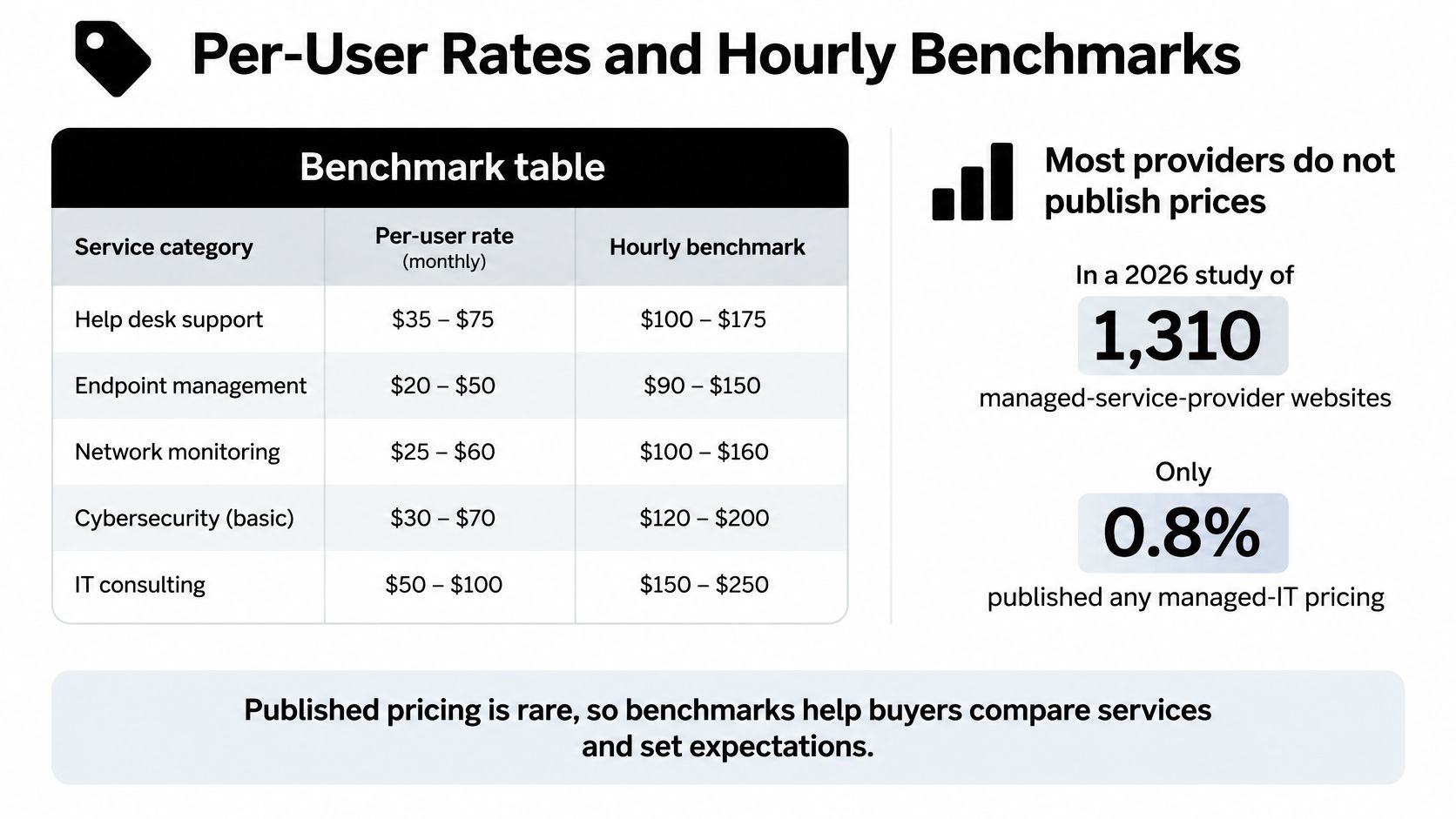
The website study found that only 0.8% of the sampled providers published any managed-IT price. Its published per-user benchmarks came from a small visible set, so the median is a reference point, not a definitive market-clearing rate.
The visual summary makes that transparency limitation explicit.
Use the benchmark to investigate scope
A quote inside the published central band is consistent with that visible pricing cluster. It doesn't prove that the provider offers good value or that its scope matches your needs.
A quote substantially below the cluster deserves a close reading of exclusions. Check whether it covers only monitoring, limited support or a narrow set of systems. Don't assume that a low rate proves poor service, either.
A higher quote needs a documented explanation. Compliance responsibilities, specialized applications and around-the-clock coverage are possible reasons, but they must appear in the service description rather than remain sales assurances.
A benchmark should tell you which questions to ask, not which contract to sign.
Run this check before treating the per-user figure as comparable:
- Confirm coverage. List the systems, support channels, security responsibilities and operating hours included.
- Separate incident labor. Identify whether break-fix hours, emergency changes and escalation work are additional.
- Normalize the quotes. Compare equivalent coverage and exclusions before comparing monthly prices.
For another perspective on the buying decision, consider the accompanying video.
Hidden Costs That Change the Effective Price
Cost items that change the effective price
| Cost Item | Usually in Fixed Fee? | How It Is Billed | Question to Ask |
|---|---|---|---|
| Backups and restore | Sometimes | Included on some plans, per resource on others | Are backups periodic on every resource, and is restore included? |
| Idle or forgotten resources | No | Usage at supplier cost in a pass-through model | Who finds and removes resources nobody uses? |
| Storage and data transfer | No | Metered per GB and per request | What are the storage, transfer and request rates? |
| Support incidents and emergency changes | Sometimes | Hourly or per incident when excluded | Is professional support included, and what does an emergency cost? |
| Supplier and third-party charges | No | Passed through, sometimes with markup | Are supplier costs passed through at cost? |
| Minimum commitments | Sometimes | Annual contract | Is the contract annual, and is the price fixed? |
Treat these entries as contract checks, not universal packaging rules. The signed scope determines whether each item is bundled, metered or excluded.
The lowest headline fee isn't automatically the cheapest option. In Capgemini's 2025 cloud research, 58% of surveyed executives described on-demand technology costs as a “big black hole”. A buyer who can't forecast the variable component hasn't established affordability, even when the management premium is transparent.
Price the workload, not the advertisement
Prepare representative bills for a prototype, shared team project and production workload. Keep resource assumptions visible rather than compressing everything into a single monthly estimate.
- Prototype: Include temporary databases, test storage and model calls. Write down the deletion condition and what information must survive.
- Team project: Include shared services, ongoing development usage and the support channel your developers will use.
- Production: Include retained resources, backup requirements, recovery needs and contractual support obligations.
For a free cloud database, retention and recovery can matter more than the initial resource charge. A disposable test database and a persistent production database aren't equivalent purchases.
Our Pay-as-you-go plan includes periodic backups and restore on every resource, persistent resources, supplier-price usage without markup, model budget caps per team and per key, and email support. Enterprise is billed annually and priced on request, with dedicated resources, multi-region and multi-system backups, an uptime SLA with credits, and professional support.
Before comparing offers, complete the same checklist for each:
- Fixed share: Identify how much of the expected bill is contractually stable.
- Pass-through costs: Name the supplier charges and any markup.
- Included operations: Resolve idle resources, backups, restores, support incidents and emergency changes.
- Enforceable oversight: Confirm spending limits and resource-level usage visibility.
Cost Controls That Keep Bills Predictable
Predictability comes from rules you establish before consumption occurs, not just from a readable invoice afterward. In Flexera's 2025 global survey of more than 750 cloud decision-makers, cloud budgets were 17% over target on average, and 84% identified cloud-spend management as a major challenge.
A fixed management charge makes the service premium easier to inspect. It doesn't prevent an application, developer or agent from consuming more infrastructure than planned.
Put controls at the point of action
- Hard budget cap: Constrain new provisioning before an experiment expands beyond its allocation. With our hard cap enabled, provisioning stops at the limit instead of charging past it. Don't confuse that provisioning rule with a guarantee that every existing resource stops consuming.
- Configurable alerts: Set notifications early enough for someone to investigate unexpected AI demand or data-transfer activity. An alert needs a named recipient and a response procedure.
- Readable usage ledger: Inspect individual resource entries instead of waiting for an invoice total. Our resource usage is recorded in a ledger customers can read at any time.
- Project and team attribution: Assign an owner when creating a database, bucket or environment. This gives the person reviewing an idle resource someone to contact.
- Lifecycle rules: Define deletion deadlines for temporary environments and retention rules for stored artifacts. These address forgotten tests and unnecessary storage accumulation.
- Rightsizing and commitments: Review capacity for steady workloads, then evaluate supplier commitments against a defensible baseline. Don't buy a commitment to make an uncertain experiment look cheaper.
Measure both the bill and the work
Track absolute variance against budget alongside a useful unit cost, such as cost per active project, database, environment or inference request. The total tells you whether you're within your spending boundary; the unit measure helps explain whether higher spending reflects more useful activity or less efficient operation.
An increase in total spend isn't automatically a problem if the team is serving more demand. Conversely, a flat bill can conceal waste if abandoned resources replace useful workloads.
Control sequence: Set the cap first, assign ownership second, configure alerts third, and review the ledger on a fixed schedule.
Record what the cap controls, who can change it and who responds when it blocks provisioning. Those operational details determine whether a spending limit works during an unattended build.
Pricing for Autonomous Builds and Abandoned Prototypes
An autonomous agent isn't a paid employee, but it can create resources that generate account charges. Machines don't occupy paid seats in our model, so an agent adds no membership fee. Its resource activity still needs an owner.
The visibility problem is concrete: Harness's 2025 FinOps in Focus report found that only 43% of surveyed developers had real-time visibility into idle resources, while 39% had that visibility into unused or orphaned resources.
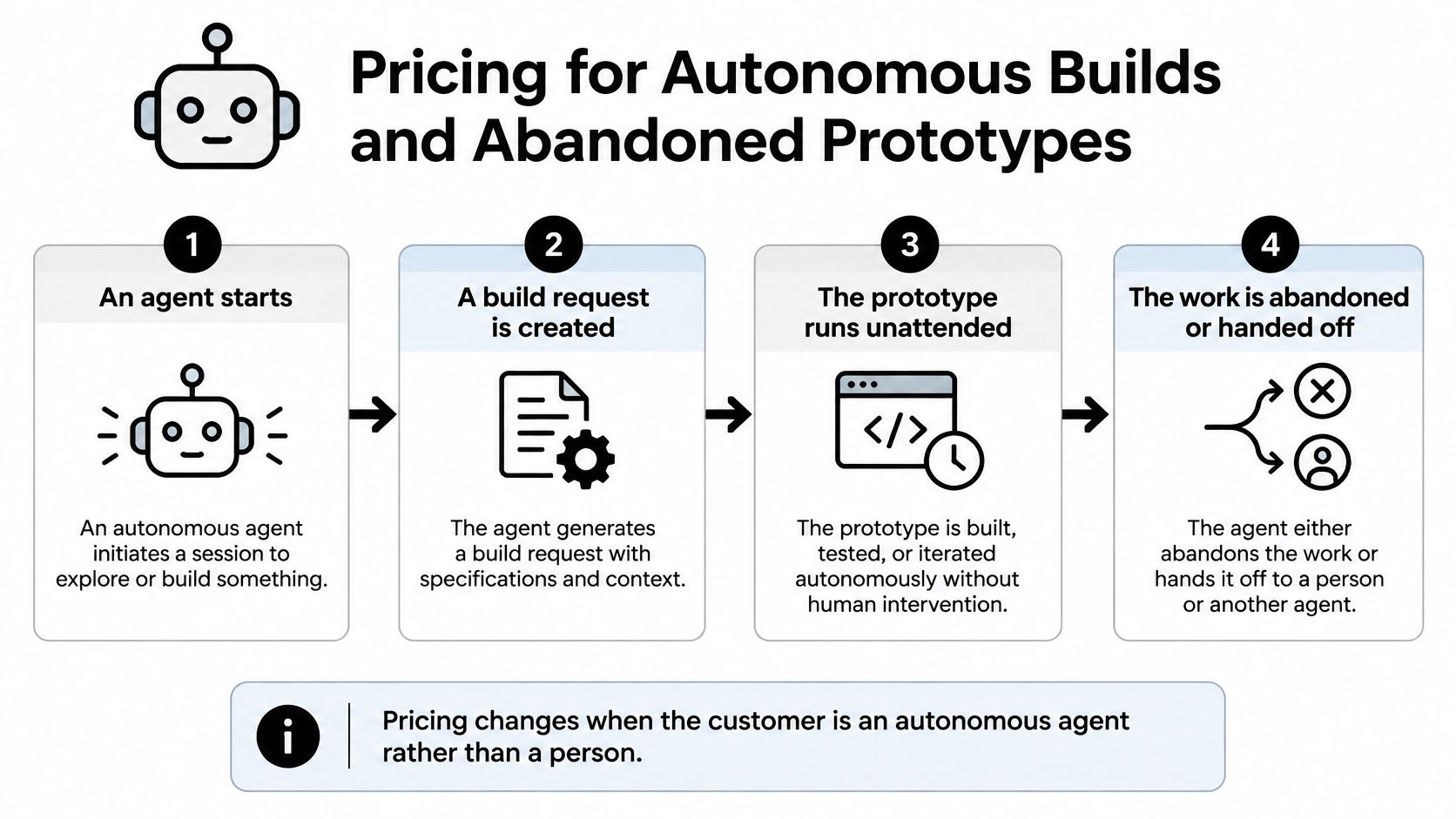
The handoff from unattended build to owned project deserves explicit billing rules.
Make the resource lifecycle auditable
- An agent starts provisioning. It can begin within account-wide free allowances before a person claims the project.
- A person claims ownership. They link the machine and establish the account responsible for billing.
- Usage reaches the account. Usage is billed after linking. Usage from an unlinked machine is also billed after linking, appearing on the next invoice for a Pay-as-you-go team.
- Someone decides what survives. Give temporary resources an explicit lifetime where supported, or deliberately retain them. Paid plans don't automatically expire resources, so persistence requires active ownership.
- The team reviews the actions. An approved agent's actions are attributed to that agent and charged to the customer's account.
For practical autonomous agent examples, evaluate the resource handoff alongside the code handoff. A completed pull request doesn't tell you whether its test database should continue running.
Use machine- and resource-scoped credentials, machine revocation, project secret rotation and the immutable audit trail to make access traceable. Revoking a machine isn't the same task as deleting the infrastructure it created; include both in the offboarding procedure.
The operating rule should be clear: no experimental resource runs past its intended lifetime without a deliberate decision to keep it. Apply that as a team policy even when the paid plan provides persistent resources.
Choose a Pricing Model Before You Sign
Choose according to what you need to preserve, share and guarantee, not the smallest advertised monthly number. The right arrangement for disposable exploration can be the wrong arrangement for an application people depend on.
Match the plan to the consequence of failure
For a solo developer prototyping without a payment card, start on Free. Treat its shared allowances as disposable development space: there are no backups or uptime guarantee, and resources can be deleted after inactivity. Keep anything you need to retain outside that assumption.
For a team sharing a project or monorepo, use membership plus pass-through usage with a spending limit. Our Pay-as-you-go arrangement provides a single usage bill across resources while keeping each project's cost visible. Assign a person to approve persistent infrastructure rather than assuming the person who ran the provisioning command will maintain it indefinitely.
For production with uptime requirements, evaluate Enterprise against your operational obligations. Compare backup coverage, restore needs, supplier charges, support incidents, emergency work and minimum commitments. An uptime agreement with credits doesn't replace a recovery plan, so document who performs restoration and how your application reconnects to recovered services.
Validate the estimate before expanding
While our service is in preview, rates, allowances and plans may change without notice. Confirm the current commercial terms before committing, and reconcile the first full month's bill against your workload assumptions.
Investigate differences at resource level. A membership calculation can be correct while your estimate misses persistent capacity, model usage or a support requirement that belongs in a different plan.
This week, start with one project on the free allowance and record what it provisions. Move the team to Pay-as-you-go once the observed usage and applicable rates support your estimate, then set the budget cap before the first production deployment. That gives you a purchasing decision based on a workload you understand rather than a headline fee.
ExtraOrbital combines infrastructure provisioning, credential management and project-level billing with a membership fee and supplier-cost usage. Visit ExtraOrbital to evaluate a project, review the current plans and set your spending boundary before moving to production.