How to Use API Key Safely: Setup, Requests and Rotation
Learn how to use API key safely: get one, store it, send requests, handle errors and rotate it after exposure.
You've got an integration ready, a terminal open, and a settings page offering to create an API key. The tempting move is to paste the value into your code, get a successful response, and move on. That works until the code reaches a browser bundle, a public repository, or a build log.
Learning how to use an API key safely means deciding where it can live before deciding how to send it. The request header is straightforward. Keeping credentials inside the right trust boundary, interpreting failures, and replacing keys without breaking consumers takes more care.
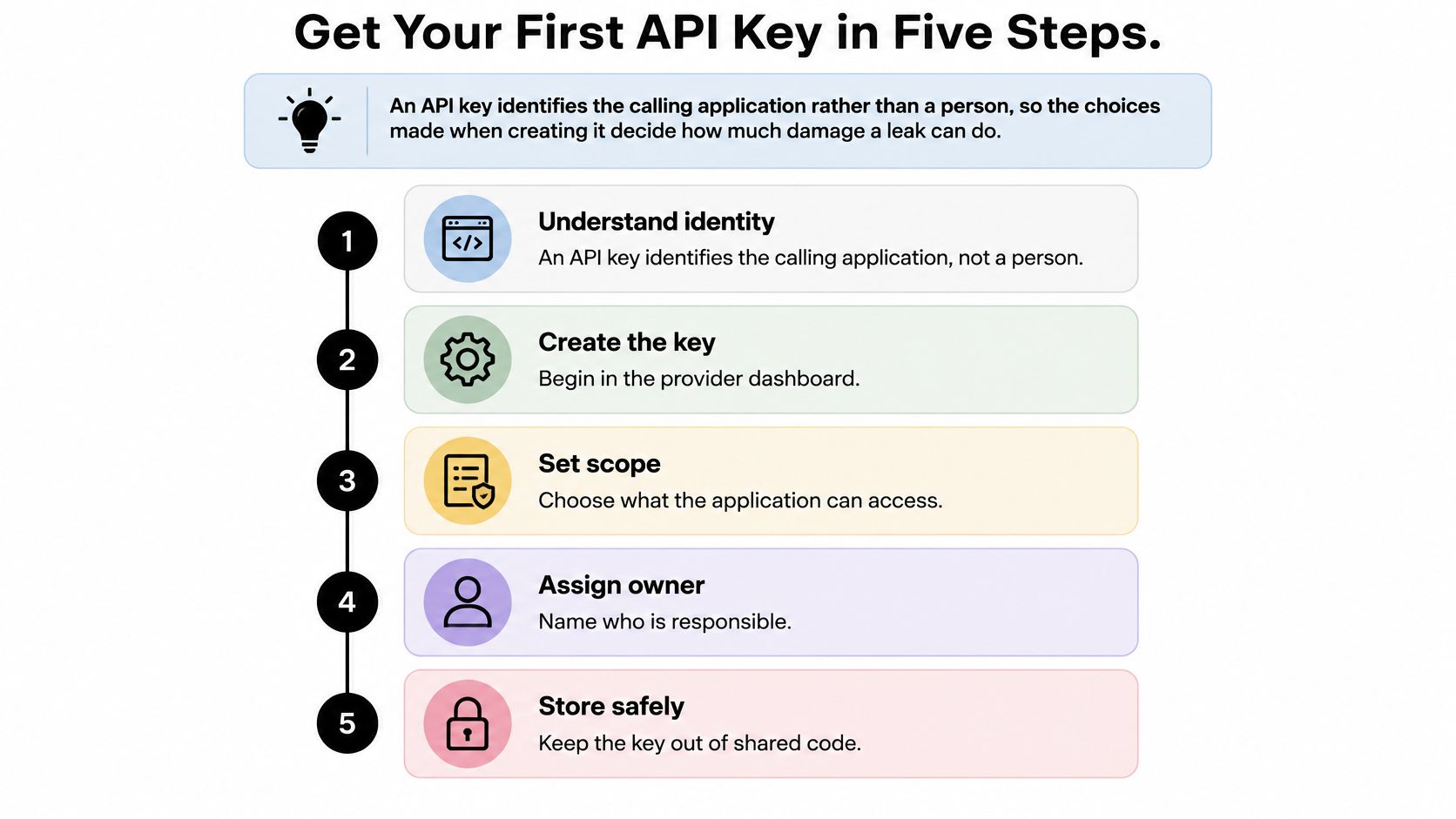
Get Your First API Key in Five Steps
An API key identifies the calling application, rather than the person using it. It doesn't replace user sign-in or permission checks inside your application. The scope you choose when creating it determines what someone could access if they copied it.
Start with the smallest useful integration. A staging service that needs to inspect a project shouldn't receive a broadly shared credential just because that's convenient during setup.
Create a credential you can identify later
Choose the team and project. Sign in and select the team the integration belongs to, then choose its project. Our ExtraOrbital API keys start with
eo_live_and belong to one team and optionally one project; a project-scoped key gets403for any other project, so choosing the wrong project creates an avoidable setup failure.Name the purpose and environment. Use a recognizable name such as
inventory-staging-reader, and record who owns the integration. A default name likenew-keywon't tell the next developer what will break when they revoke it.Copy the value immediately. We show an
eo_live_key only once when it's created, so losing the value means creating a replacement. Copy it directly to its intended destination, not into a chat, shared document, or support ticket.Save it where the application reads configuration. For local development, use the project's untracked environment file; for a deployed service, use its secret store. The usual mistake is saving the key somewhere convenient without checking whether the application loads that location.
Make a read-only test request. Confirm that the credential reaches the intended API before adding business logic. Don't debug authentication, pagination, and write operations simultaneously, because you'll struggle to tell which part failed.
Use this flow as a setup checklist rather than treating key creation as an isolated dashboard task.
Working setup: The secret exists in the intended runtime environment, the application reads it without a source-code edit, and no startup message prints its value.
Check configuration loading before changing application code. A correctly created key won't help if your development server started before the environment file changed or your deployment references the wrong secret name.
Where an API Key Can Safely Live
A secret key stops being secret the moment an untrusted client can read it. A bundler that inlines API_KEY into shipped JavaScript has already published the credential, and anyone who opens the built file can extract it in seconds.
The boundary that matters is trusted server versus user-controlled device. Where the value sits matters less than who can read what ships.
Where a secret API key is safe to hold
| Context | Safe to hold secret key? | What to do instead |
|---|---|---|
| Backend server code | Yes | Read from an environment variable or secrets manager at startup |
| Browser JavaScript | No | Call your own backend route that adds the key |
| Public mobile app | No | Proxy through a backend; never bundle the key |
| Local script on your machine | Yes | Keep it in a git-ignored environment file |
| CI pipeline | Yes | Use the CI secret store with masked logs |
| Automated tool or agent | Limited | Issue a separate, short-lived, narrowly scoped credential |
A backend can retrieve the secret and make authenticated upstream requests without ever showing the value to a user. Browser and mobile clients reach that backend through the application's own user sign-in, and the backend checks what the user may do before attaching its upstream key.
Some endpoints enforce this boundary directly. ExtraOrbital's token exchange must be called from your app's server because its response carries no CORS headers, so a browser page cannot read it even if it tries. Treat every credential the same way: if user-facing code can touch it, assume the user owns it.
Resist the unrestricted forwarding endpoint. Accept defined operations, validate inputs, and enforce user-level access checks. A hidden key behind an open proxy still lets strangers spend its quota.
Match delivery to the runtime
For local scripts, confirm Git ignores the environment file before pasting a credential into it, and scan before pushing. Keys committed to a repository stay reachable in history long after the file is deleted, and coding agents will happily commit a working .env if you let them. When several credential sources exist on one machine, an explicit EXTRAORBITAL_TOKEN takes precedence over cached credentials, so the value a script used is never ambiguous.
In CI, inject secrets only into jobs that need them and keep shell tracing off. Do not assume log masking catches a value that a script transforms or prints in fragments.
Agents need one more boundary, between provisioning credentials and application runtime credentials. A tool allowed to create infrastructure shouldn't hand that same authority to the app it builds. ExtraOrbital issues agent tokens as short-lived Ed25519 JWTs to machines registered through the Agent Auth Protocol, and each provisioned resource gets its own credential for the app, which the platform does not retain. You can attribute calls to a specific tool and revoke it without touching anything else.
Before approving an integration, ask:
- Visibility: Who can read the final value, including through diagnostics?
- Routing: Which requests must pass through an authenticated backend?
- Failure: What access would someone gain if a log contained this credential?
Send the Key and Read the Responses
Our API base URL is the ExtraOrbital API endpoint. Send the credential in the Authorization header using the Bearer scheme, not in a query parameter.
With API_KEY already loaded into your environment, the request shape is:
curl https://extraorbital.dev/api/v1 -H "Authorization: Bearer $API_KEY"
Don't replace $API_KEY with the literal eo_live_ value in a command you'll leave in shell history. Use a read-only request for initial verification, and inspect both the HTTP status and response body before treating the integration as ready.
Response codes, meanings and fixes
| Status | Meaning | Fix |
|---|---|---|
200 OK | Request accepted and data returned | Continue and parse the response body |
401 Unauthorized | Missing, incorrect, or revoked credential | Check secret loading and the stored value before editing request code |
403 Forbidden | Key belongs to another team or project | Use a key scoped to this project |
402 Payment Required | Team is past its Prototype allowance or resource count with no human linked, or a hard budget cap was reached | Link a person where required, then review usage and caps |
429 Too Many Requests | Rate or quota limit reached | Wait and retry with growing delays |
500 Server Error | Problem on the provider side | Retry later and check service status before rotating keys |
For 401, inspect the configuration path first. Common causes include an empty variable, whitespace copied with the value, a stale deployment secret, or a revoked key. Compare the stored secret securely against the one-time copy if it's still available; don't print either into a debugging transcript.
A 403 means changing the request header won't fix the scope mismatch. Check the requested project and the credential's team before granting broader permissions.
For 402 PAYMENT_REQUIRED, inspect the usage view rather than deleting resources blindly. Our API returns it when a team exceeds its Prototype allowance or resource count without a linked human, or reaches a hard budget cap.
Retry selectively and finish pagination
For 429, respect a supplied Retry-After header and otherwise use increasing delays with jitter. A concurrency spike shouldn't trigger an immediate retry storm. After a server error on a write, check whether the operation completed before resending it.
Our list endpoints use keyset pagination: limit accepts 1 to 200, defaults to 50, and responses include hasMore and nextCursor. Continue requesting pages while hasMore is true, passing the returned cursor through the endpoint's documented cursor parameter.
Keep this upstream handling inside your backend application development workflow, where you can normalize errors without exposing credentials. For an unresolved failure, retain the status and complete response body in a restricted diagnostic record, redacting secrets and sensitive payload fields before sharing it.
Store, Scope and Protect Your Keys
Treat each stored key as an owned application credential, not a password every process shares. Separate credentials let you shut down one integration without taking unrelated services offline.
Google Cloud's API-key best practices recommend restricting keys, monitoring usage, deleting unused credentials, and periodically replacing active ones. Make those tasks part of deployment ownership rather than leaving them to whoever remembers the dashboard password.
Apply controls before production
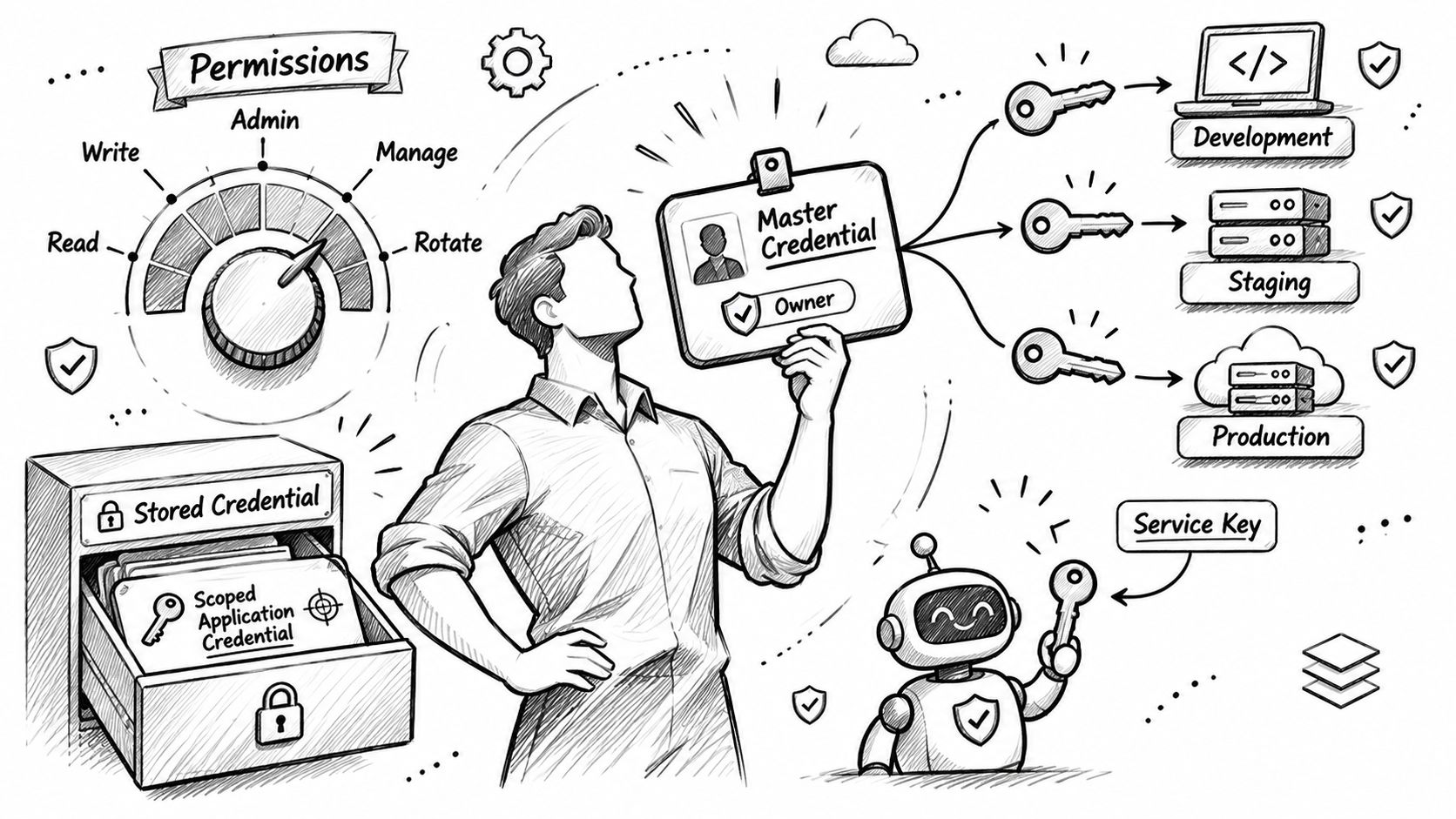
- Separate environments and consumers. Issue distinct credentials for development, staging, and production, and separate services or machines where practical. An experimental script shouldn't inherit production access.
- Limit authority. Restrict APIs, operations, application identities, origins, or network ranges wherever supported. Use restrictions together rather than treating an origin restriction as a substitute for secrecy.
- Constrain consumption. Enable quotas, budget caps, and billing alerts before production traffic starts. Alerts tell someone to investigate; a supported hard cap can stop additional consumption.
- Assign ownership. Record the owner, purpose, creation date, and expiry or review date. Include the deployment or job that consumes the credential so replacement doesn't become guesswork.
The distinction between management credentials and service credentials should remain visible in your configuration.
Protect delivery and inspect usage
Retrieve production values from a dedicated secrets manager or platform secret store. An environment variable is a delivery mechanism, not encrypted storage: diagnostics, crash reports, process inspection, and careless logging can expose it.
Don't bake secrets into container images, build artifacts, or shared configuration. Redact authentication headers before logs are written, and send credentials only over TLS using the API's documented authentication mechanism. URLs are unsuitable for secrets because browsers, proxies, analytics systems, and servers can retain them.
A secret manager helps control access to a credential. It doesn't make an overprivileged credential safe.
Inspect usage for unexpected regions, unfamiliar operations, unusual request timing, and traffic spikes. Compare those signals against deployments and scheduled jobs before assuming every anomaly is an attacker.
Each resource we provision gets its own application credential, and we don't keep a copy of it. Preserve the delivered value securely; if it's lost, arrange a replacement rather than expecting recovery. When deciding whether to generate a secret key, distinguish application-generated secrets from credentials that must come from the service issuing them.
Schedule a recurring inventory review. Confirm each owner and consumer, then disable credentials that no active service needs.
Rotate or Revoke a Key After Exposure
Choose the path before touching the deployment: routine replacement prioritizes continuity; suspected exposure prioritizes containment. Waiting for a clean rollout is reasonable for scheduled maintenance, but not for a credential someone else may already possess.
Use this decision flow to distinguish those operations.
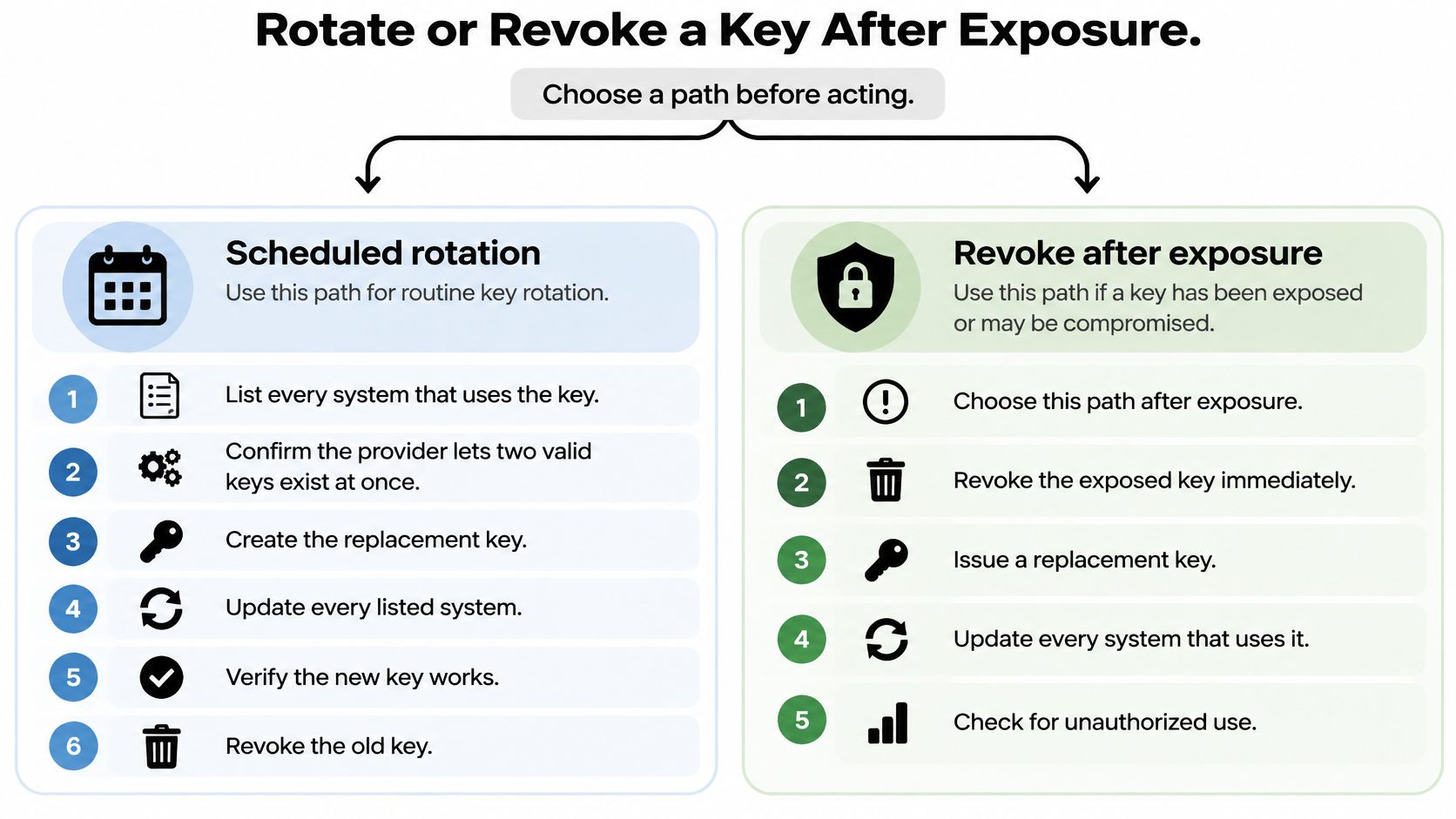
Scheduled rotation without avoidable downtime
- Inventory consumers. Include background workers, scheduled jobs, CI tasks, and sleeping deployments, not just the web server.
- Confirm overlap support. Check that the provider permits old and new credentials to remain valid simultaneously. Without overlap, plan a coordinated cutover rather than promising zero downtime.
- Create the replacement. Keep permissions identical or narrower; rotation isn't a reason to expand access.
- Deploy a new secret version. Update every consumer and ensure each process reloads the value. Updating the store alone won't refresh a process that caches configuration.
- Verify representative paths. Exercise reads, permitted writes against safe test data, quota handling, and expected errors.
- Compare behavior. Check authentication failures, request volume, and application errors against the pre-deployment baseline.
- Retire the old credential. Disable it after consumers succeed, observe for missed dependencies, then delete it. Keep the overlap short.
Record the operator, timestamp, affected systems, and rollback action. For planned rotation, rollback may temporarily restore the previous secret version while it remains valid.
Exposure requires immediate revocation
If a key appears in a public repository, CI log, container image, support ticket, or client bundle, revoke it immediately. Issue a constrained replacement, restore consumers, inspect historical usage, and assess unauthorized access or spending.
The OWASP Key Management Cheat Sheet provides guidance for managing key lifecycles and compromise. Don't restore an exposed credential as a rollback shortcut, even if doing so would bring a failing service back faster.
Deleting the visible string isn't containment. Remove it from version history, inspect forks and published artifacts, and assume cached copies may remain. If the compromised credential could create database access, inspect downstream users and credentials too.
Incident priority: Stop further authenticated misuse first. Restore service with a new credential, then complete cleanup and investigation.
Use the accompanying video alongside a written runbook your team can execute under pressure.
Confirm the Key Works and Choose Your Next Step
A successful request proves the server accepted a credential. It doesn't prove the integration has appropriate permissions, useful attribution, or clean build output. Validate those separately before depending on it.
Run the acceptance checks
- Read the expected data. Make a read-only call against the API base and confirm
200plus the expected response content. Don't treat an unrelated successful response as proof you selected the intended project. - Test a permitted write. Use a disposable, non-production resource if the integration needs write access. For an intentionally read-only credential, verify that a write is refused instead of expanding permissions to make the test pass.
- Check attribution. Find the request in available usage or audit records and confirm its project, credential identity, and purpose are recognizable.
- Exercise authentication failure. Substitute an invalid value, confirm authentication fails, then restore the secret from its approved store. Ensure the application doesn't retry an invalid credential indefinitely.
- Inspect for leakage. Check tracked files and diffs, build output, and terminal scrollback for
eo_live_.git statusalone lists file changes; it doesn't inspect their contents.
If a check fails, fix that failure directly. Don't create a broader credential to conceal a scoping mistake, and use the emergency revocation path if your inspection uncovers exposure.
Leave an operational handoff
Record the owner, every consumer, the expected permissions, and a review date. Put the review on a calendar or issue tracker so someone confirms the key is still needed.
Your next integration should receive its own project-scoped credential and the same acceptance checks. That gives you a repeatable deployment habit, not another unexplained secret.
ExtraOrbital provisions databases, AI, storage, and auth for a project with one command, without requiring separate provider accounts. Visit ExtraOrbital to set up your project, then keep provisioning authority separate from the runtime credentials your application receives. Your first team starts on the Free plan with no card required.