Generate Secret Key Safely: Length and Storage Tips
Learn how to generate secret key values with OpenSSL, Node.js and Python, choose the right length, and store them safely outside your source code.

Your app won't start because JWT_SECRET is missing. You're about to paste a random-looking string into .env, restart the server, and get back to building. That works until the value turns out to be predictable, gets committed, or also encrypts data you can't recover after replacing it.
A search for “generate secret key” usually leads straight to a command. The command is the easy part. First, identify what you're generating, what must keep working when you replace it, and where the value will live.
Choose the Right Key Type and Length
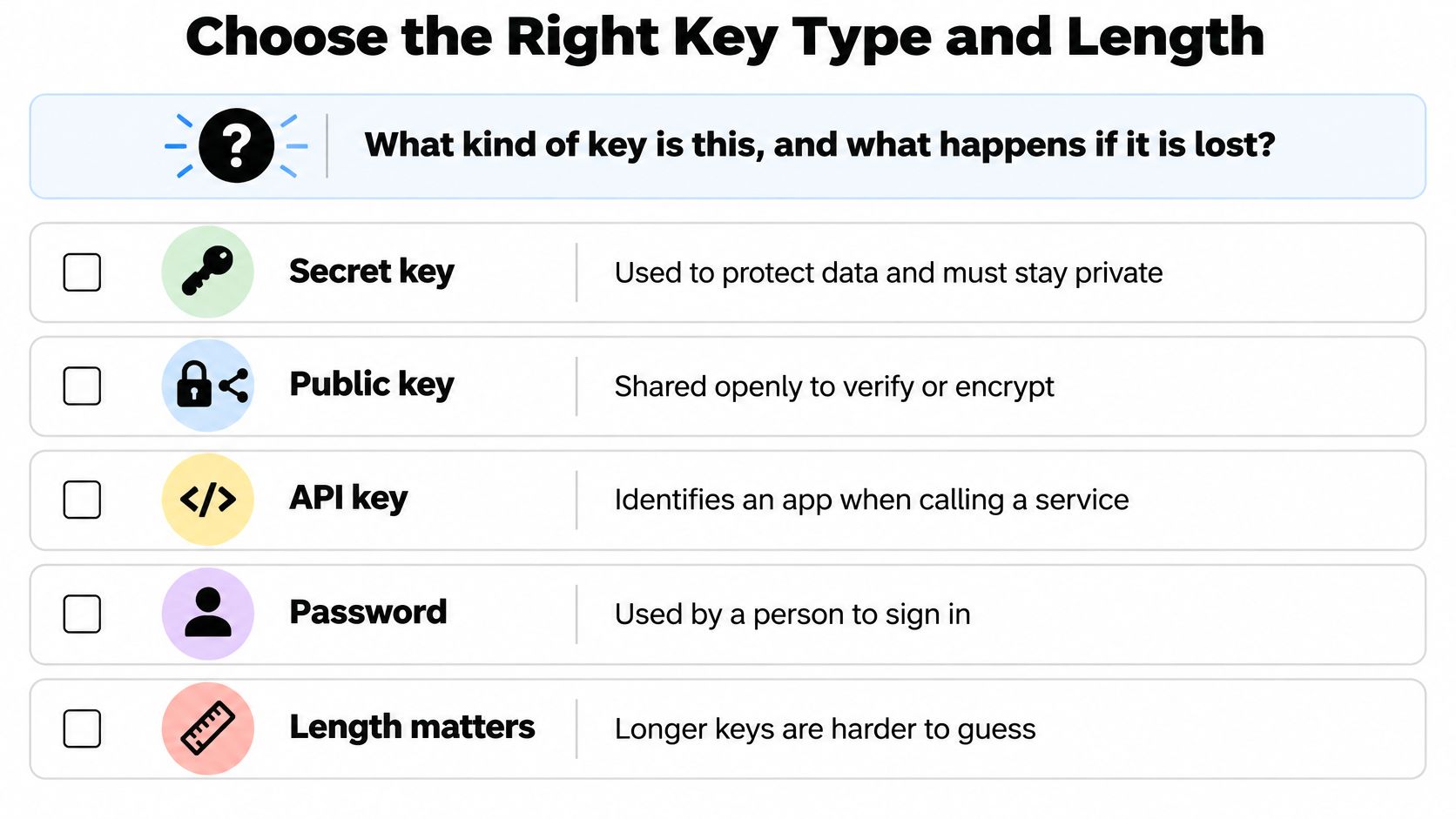
What kind of key is this, and what happens if it is lost? Answer that before opening a terminal. A session-signing secret, an encryption key, and a provider-issued credential aren't interchangeable, even when your application stores all of them as environment variables.
NIST's key-generation guidance distinguishes random-bit generation, derivation from another key, password-based derivation, and key agreement. It also requires the random-bit generator's security strength to match the protection required. A long string alone doesn't establish that.
Key types, lengths and recovery rules
| Key type | Typical length | Generation method | Regenerate or back up? |
|---|---|---|---|
| Application secret (session or JWT signing) | 256 bits minimum for this random-secret workflow, subject to the signing algorithm | Cryptographically secure random bytes | Regenerate; existing sessions end when the old signing secret is no longer accepted |
| Symmetric encryption key (AES) | 256 bits for AES-256 | Secure random bytes or a key management service | Back up securely in a key manager; losing it loses access to the data |
| Password-derived key | Set by the key derivation function and consuming algorithm | Password plus a random salt through a key derivation function | Recover from the password, stored salt, and derivation parameters; don't substitute a newly random key |
| Asymmetric key pair (Ed25519 or RSA) | Fixed by Ed25519, or selected under the protocol's RSA requirements | Key generation library | Keep the private key secret; rotate on compromise and preserve recovery material where required |
| Provider credential (webhook or client secret) | Set by the provider | Issued in the provider dashboard or credential API | Regenerate through the provider; cannot be created locally |
These lengths are algorithm choices, not equivalent measures of strength. Don't compare an RSA key's encoded length with a symmetric secret's length and assume the larger number is stronger.
Decide What Must Survive Replacement
For password-derived encryption, retain the salt and derivation settings alongside the ciphertext. The salt isn't a secret, but losing it can prevent recovery. A key derivation function also doesn't turn an easily guessed password into a high-entropy random secret.
For asymmetric authentication, distribute the public key, not the private key. For a provider credential, use the issuer's credential workflow rather than manufacturing a string that merely matches its prefix.
Before generating anything, check:
- Purpose: Is the value signing, encrypting, or authenticating a caller?
- Recovery: Can you replace it without making stored data unreadable?
- Distribution: Who needs the secret itself, and who needs only a public key or permission to use it?
Generate a Secret Key Step by Step
For a random application secret, the default command is openssl rand -hex 32. The equivalent calls below use cryptographic randomness rather than a general-purpose random-number API.
NIST's key-management guidance ties generated-key strength to both generator design and seeding entropy; the output sizes below represent 32 random bytes, or 256 bits, encoded as 64 hexadecimal characters, 44 padded Base64 characters, or 43 unpadded URL-safe Base64 characters.
Secret key generation commands and output sizes
| Method | Command or call | Output size | Format |
|---|---|---|---|
| OpenSSL | openssl rand -hex 32 | 256 bits | 64 hex characters |
| OpenSSL | openssl rand -base64 32 | 256 bits | 44 Base64 characters, including padding |
| Node.js | crypto.randomBytes(32).toString('hex') | 256 bits | 64 hex characters |
| Python | secrets.token_hex(32) | 256 bits | 64 hex characters |
| Python | secrets.token_urlsafe(32) | 256 bits | 43 URL-safe characters |
The Node.js call assumes you've imported node:crypto; the Python calls assume you've imported secrets. These examples show the generator operation, not a recommendation to print production credentials into terminal scrollback.
Generate, Validate, Then Store
Confirm the object and algorithm. Use this workflow for a random shared application secret, not a password-derived key, asymmetric private-key file, or provider credential. Check the consuming library's requirements before choosing the byte count.
Use the cryptographic API. Choose OpenSSL, Python's
secrets, or Node.jscrypto.randomBytes. Don't substituteMath.random, Python'srandommodule, a timestamp, a counter, a password, or a UUID whose cryptographic randomness you haven't verified.Check the raw byte count. In application code, retain the generated byte buffer long enough to validate its length before encoding. If generation throws an exception or returns an unexpected result, stop provisioning rather than falling back to a weaker generator.
Encode for the destination. Hex is straightforward to validate and copy; Base64 is more compact. Standard Base64 and URL-safe Base64 use different alphabets, so select the format your configuration parser and protocol accept.
Reject malformed values. Validate the expected character set and decoded length. Don't truncate an oversized result or repair unexpected punctuation. Handle a command's trailing line terminator as transport formatting, not part of the secret.
Write directly to protected storage. Use a secret manager's input API or a restrictive local file destination. Don't put the generated value in command-line arguments, chat, debug output, or shell commands that embed it exactly.
Practical rule: Encoding changes how random bytes are represented. It doesn't add entropy, and a randomness-looking output isn't proof of a secure generator.
For local development, our ExtraOrbital CLI's provision --local generates detected local secrets only, on your machine, with no network request and no account. Supported values such as JWT_SECRET don't create hosted resources; provider-issued secrets aren't generated locally.
Finish with a functional check: the application starts, a test token signs and verifies, and git status doesn't list the secret-bearing file. That last check is useful, but it doesn't replace checking whether the file was already tracked.
Keep Secrets Out of Your Source Code
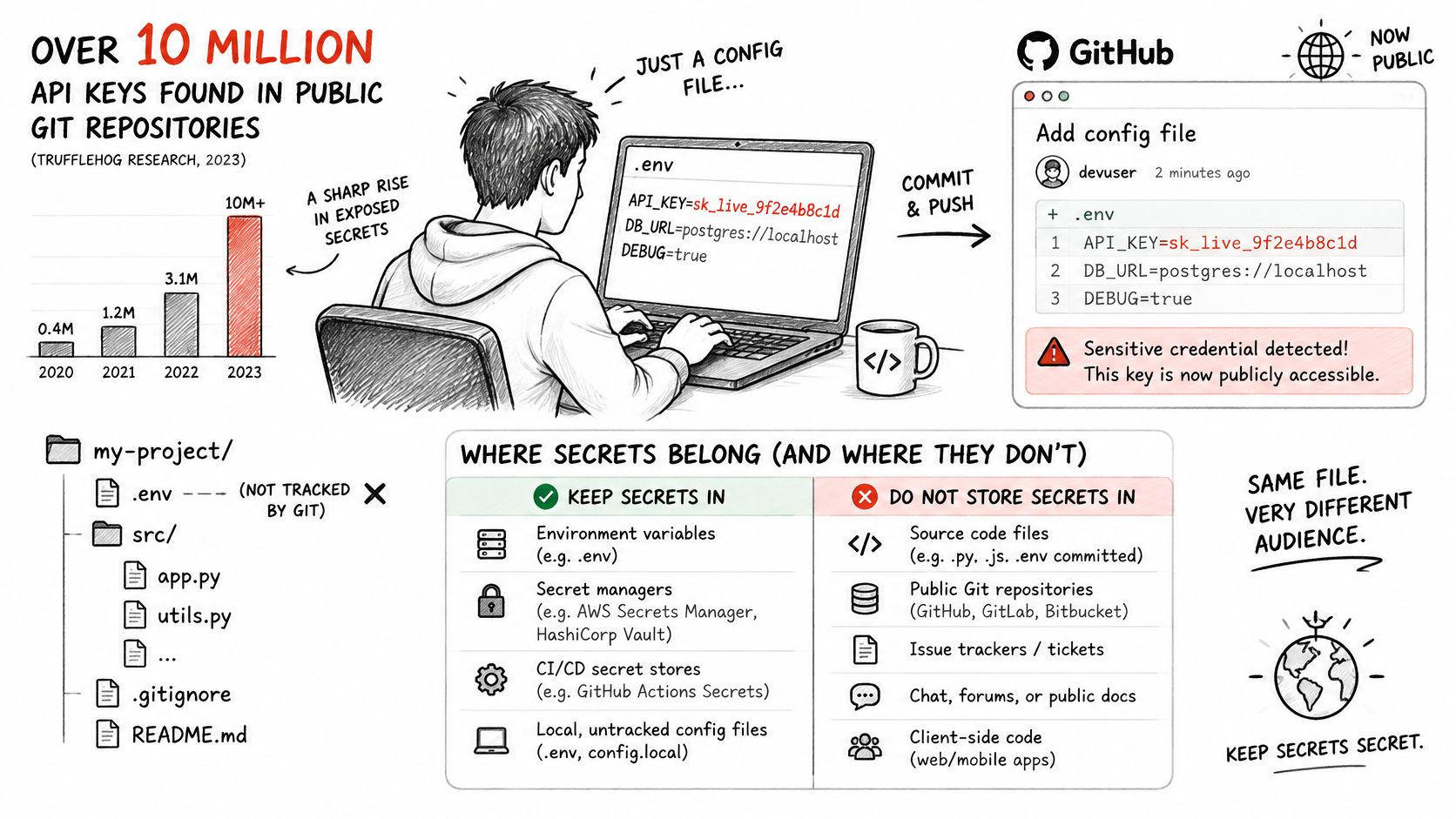
Say a developer pushes a branch containing a live API key. CI detects the secret and blocks the merge, but the branch has already reached the remote repository. The team must rotate the credential, not assume a blocked merge prevented exposure.
The scale isn't hypothetical: in 2024, GitHub reported detecting more than 39 million leaked secrets on its platform, according to GitHub's explanation of secret-leak exposure. The ordinary failure path is still a credential typed into a configuration file that someone commits.
Where each secret should live
| Storage location | Use it for | Main risk |
|---|---|---|
Local .env file excluded by .gitignore | Local development | Committed accidentally if ignore rules are missing or the file is already tracked |
| Secret manager | Production runtime | Over-broad access if roles aren't restricted |
| Encrypted CI/CD variables | Build and deploy steps | Administrators or permitted workflows may expose or replace values |
| Hardcoded in source code | Nothing involving real credentials | Remains in Git history after deletion |
Encryption in the CI settings screen doesn't prevent a workflow from printing a decrypted value. Restrict which branches, jobs, and identities can access production secrets, and don't make them available to untrusted pull-request code.
Make the Safe Path the Default
- Ignore before creating: Add
.envand your actual local secret-file patterns to.gitignorebefore the first commit. Keep.env.examplelimited to variable names and unmistakably nonfunctional placeholders. - Scan before publishing: Run a secret scanner in a pre-commit hook and CI. Local scanning catches mistakes before upload; CI provides a shared enforcement point.
- Separate environments: Give development, staging, and production different credentials. Don't let a disposable preview deployment authenticate to production services.
A deleted line isn't a revoked credential. If a real secret entered Git history, replace it at its issuer or verifier, then clean up repository history and other copies as appropriate. History rewriting alone cannot invalidate a copy someone already downloaded.
Provider-issued values belong in the same controlled storage workflow. Our CLI never generates STRIPE_WEBHOOK_SECRET or GITHUB_CLIENT_SECRET; obtain those through the issuing service and store them without passing them through source code.
Make an inventory of where each secret currently lives: developer laptops, deployment settings, CI, application containers, and backup systems. An unknown copy is an unresolved access path.
Track Provenance and Metadata for Each Secret
Before a secret goes live, record enough to answer: Was it generated securely, which process can read it, and when must it change? Store the record separately from the value, preferably in the secret manager's metadata or a restricted team tracker.
NIST's DRBG guidance requires self-tests before operational use and prohibits returning test-generated bits as production output. Your provisioning wrapper shouldn't implement its own cryptography, but it must respect failures from the maintained generator it uses.
Keep a Record You Can Verify
- Resource ID: Identifies the service or machine the credential belongs to.
- Creation time: Establishes when provisioning produced the credential.
- Algorithm and generator: Records the cryptographic purpose and the actual generating API or managed implementation, not merely “helper function.”
- Length in bits: Records raw key-material length rather than encoded string length.
- Environment: Distinguishes production from development and preview resources.
- Owner: Names the person or team responsible for consumers and replacement.
- Review date: Sets a deliberate point to reassess continued use.
- Rotation status: Records whether replacement is pending, deployed, or complete.
Metadata establishes intent and provenance; access logs establish use. Enable the secret manager's audit facility and ensure it identifies the machine or workload reading the value. A local .env file doesn't provide equivalent access auditing.
Generation succeeds only when the generator, validation, protected write, and metadata record all succeed.
If generator health checks fail, stop provisioning and quarantine the affected workflow. Preserve an audit event without the secret, investigate whether earlier credentials were affected, and clear temporary buffers where feasible.
Keep metadata out of a repository when it would expose internal resource mappings or encourage someone to add values later. The owner should be able to locate consumers without needing access to every credential.
Rotate, Revoke and Confirm Storage Before Deploy
In 2024, Nightfall reported that 35% of exposed API keys were still active, based on its analysis of more than 171,000 exposed secrets across SaaS applications, generative-AI tools, email, and endpoints, according to Nightfall's published findings. Finding a leak isn't the same as closing it. The issuer or verifier must stop accepting the exposed value.
For planned rotation, inventory consumers before making changes. For confirmed exposure, decide whether continued attacker access is more dangerous than an interruption; don't automatically apply a comfortable maintenance procedure to an active incident.
Use a Rotation Sequence That Matches the Credential
Generate or issue the replacement. Use the correct authority: your cryptographic generator for an application secret, the provider for its credential, or the key manager for managed encryption material. Confirm the replacement reaches protected storage before relying on it.
Prepare the accepting service. Where supported, configure the verifier to accept the replacement before clients switch. For signed tokens, that can mean signing new tokens with the new key while temporarily verifying older tokens with the previous key.
Update every consumer. Include CI jobs, background workers, scheduled tasks, staging integrations, and other machines. Verify that running processes have reloaded the credential; updating a secret-manager entry doesn't guarantee an existing process has refreshed its cached value.
Revoke the old credential. Disable it at the provider or remove it from the verifier's accepted keys. Test that an authentication attempt using the retired credential fails. Don't leave revocation as an unchecked deployment ticket.
Watch for missed consumers. Monitor authentication failures and credential-version metadata through a complete workload cycle, including scheduled jobs. Identify callers by resource or nonsecret key identifier, never by logging the credential they sent.
Immediate revocation closes exposure fastest, but it breaks consumers still using the retired value. A grace window preserves continuity while you migrate clients, but anyone holding the old credential may retain access until that window ends.
Our rotation policy invalidates the old secret immediately unless a --grace period is given. For a sensitive resource, the replacement stays out of .env unless you pass --write-env. Treat both choices as deliberate operational decisions, not flags to add automatically.
Preserve Recovery Without Preserving Unnecessary Access
Each resource should have its own credential so replacing access to a worker's database doesn't disrupt unrelated resources. We issue an app credential per resource and don't keep a copy of its value. Confirm the destination is correct before completing your handoff.
Encryption requires a different retirement policy from authentication. Don't destroy an encryption key until you've verified how existing ciphertext will remain readable. You may need to re-encrypt data or rewrap data-encryption keys, retain version mappings, and test recovery before retiring old material.
NIST's key-management guidance also makes an important exception to blanket backup advice: keys used for random-bit generation shouldn't be backed up or archived and must be replaced if lost or modified. A recovery policy must identify the key's purpose, not just label everything a secret.
A successful deployment doesn't prove a successful rotation. Verify that legitimate clients work and that the retired credential no longer does.
For a session-signing secret, the operational cost may be requiring users to authenticate again. For encryption, an unplanned replacement can make data inaccessible. Choose the recovery procedure before executing the change.
Before deploying, check the complete boundary:
- Exposure: No plaintext copy remains in Git history, logs, shell history, or captured environment dumps.
- Storage: The replacement is in its own environment's protected destination, with appropriate access controls.
- Retirement: Every old credential is revoked or has a documented, time-bounded reason to remain usable.
- Recovery: Any retained decryption material has a tested purpose and a named owner.
Fix the first failing item before the next deploy. Don't treat a green application health check as permission to leave an exposed credential active.
ExtraOrbital supports local secret generation and infrastructure credential management with machine-scoped access, audit trails, and rotation controls. Visit ExtraOrbital to provision the secrets your project needs, then verify their storage and retirement rules before putting them into production.
Crafted with Outrank tool