How Do API Keys Work? a Practical Guide for Developers
Wondering how do API keys work? See how servers check them, where keys leak and how to store them safely.

A dashboard tab is open on your second monitor. A key sits in a .env file copied from a tutorial, and nobody on the team can say which service uses it, what it is allowed to touch, or when it was last changed. It works, so it stays. Then one day a call fails, or a bill arrives that nobody can explain, or someone finds the string in a public commit, and you have to reason about a credential you never really understood.
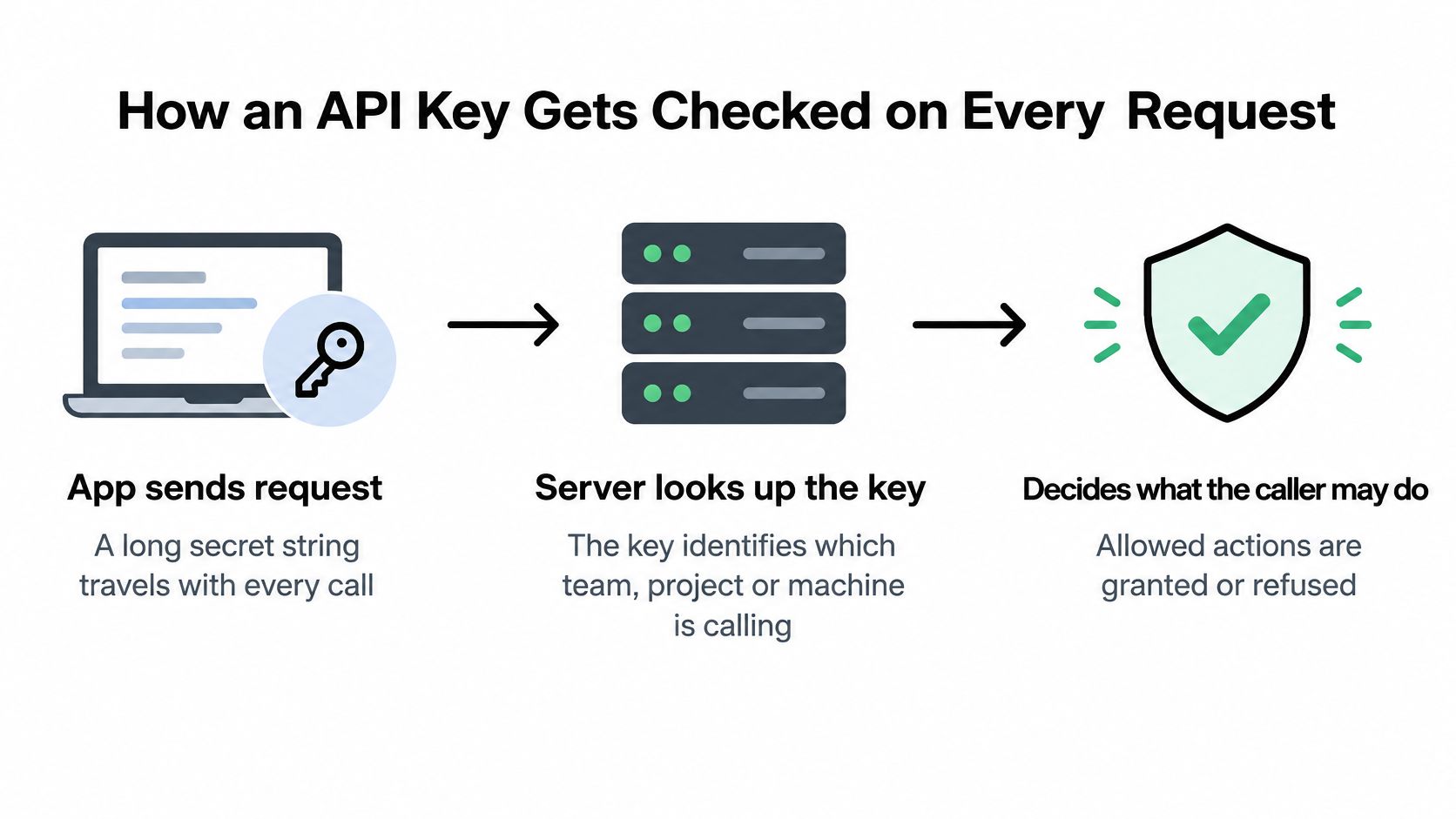
An API key is a secret string your application attaches to every request, and the server looks that string up to work out which team, project or machine is calling and what the caller is allowed to do. It remains one of the most common credentials on the web because it is simple to issue, simple to attach, and unforgiving when it slips.
The walkthrough ahead follows one key through its whole life: how a server checks it on every call, what it can and cannot prove about the caller, how to store and rotate it, and what to do in the first hour after it leaks.
How an API Key Gets Checked on Every Request
Every call your app makes with a key runs through the same five steps, and knowing them turns a 401 from a mystery into a message. OWASP's guidance on long-lived secrets describes the shape of it: the client sends the key with each request, usually in an X-API-Key or Authorization header, and the server compares it against stored credential data before applying access, quota, billing and rate-limit rules.
The five checks a server runs
- The app attaches the key. Your code reads the secret from the environment and puts it on the request. Nothing else travels with it.
- The server finds the key. It looks the value up in its credential store and maps it to an owner, a project and a quota.
- It checks scope. The key can be perfectly valid and still not allowed to touch this endpoint or this resource.
- It applies rate limits and billing. The call counts against a team allowance, a budget, or both.
- It runs the request or refuses it, then writes a log line for audit and detection.
A hotel keycard is the closest everyday parallel. The card opens the room it was programmed for. It cannot tell the front desk who is carrying it.
The mental model that holds up: a key is a bearer credential. Whoever holds a working value gets whatever that value unlocks, and the server has no way to ask a human for confirmation.
Now the request itself. Sending a key over HTTPS to a reports endpoint looks like this:
curl -H "X-API-Key: $REPORT_KEY"
A good key returns 200 OK with JSON. Revoke that key in the dashboard, run the identical command again, and you get 401 Unauthorized with a body saying the credential isn't recognized. Nothing in your code changed. The server stopped finding the value in its records.
Match the error to the fix
| Error | Status code | Fix |
|---|---|---|
| Key missing or misspelled | 401 Unauthorized | Check the header name and value, then resend |
| Key revoked, rotated or deleted | 401 Unauthorized | Replace it with the current key and redeploy |
| Valid key used on another project | 403 Forbidden | Create a key scoped to that project |
| Too many requests in a time window | 429 Too Many Requests | Back off and retry, or raise the quota |
| Team past its allowance or at a hard budget cap | 402 Payment Required | Raise the cap or link a human owner to the team |
A 403 with a key you know works is the response that costs people the most time. The key isn't broken. It's scoped somewhere else. On our platform, keys carry the eo_live_ prefix, are scoped to one team and optionally one project, and a project-scoped key returns 403 for any other project. Providers that separate environments or workspaces behave the same way.
The last row catches people out because it looks like an auth problem and isn't. A 402 means the team ran past its allowance or hit a hard budget cap, so the fix lives in billing rather than in the header. If you're wiring these responses into a client that has to retry sanely, this backend application development guide covers the surrounding error-handling patterns.
Why an API Key Identifies an App, Not a Person
The password comparison is where understanding starts to drift. A password proves a person is who they claim to be. An API key usually does something narrower, as the OWASP key management cheat sheet points out: it identifies a project, workload or client application, supports metering and throttling, and generally does not prove which individual user authorized the request. That's the whole distance between "which app is this" and "which person said yes."
| Credential | Identifies | Typical use | Exposure if leaked |
|---|---|---|---|
| API key | The calling app, project or machine | Server-to-server calls, metering and quotas | Anyone holding it can make the permitted calls until it is revoked |
| OAuth access token | A user who approved access | Apps acting on a person's behalf | Short-lived and limited to the scopes the user granted |
| Signed request or workload identity | A specific workload, proven cryptographically | Sensitive operations and cloud IAM checks | Harder to replay, because the signing secret never travels with the request |
Two systems, not one, is the pattern that ships. A user-facing app uses OAuth 2.0 or OpenID Connect so the person can see, approve and later revoke what the app may do on their behalf. Backend services use narrowly scoped keys for fixed jobs nobody needs to consent to, like a nightly sync pulling rows into a warehouse.
A weather API key stored on a server is a reasonable choice: the data belongs to no user, and the key identifies your project. An app that reads someone's calendar is a different problem. That call needs delegated access the user approves and can revoke, because a key has no way to record consent.
There's a financial layer most guides skip. Holding a working key means the holder can trigger billable activity, so a leaked key is a cost incident as much as a security one. Metering exists precisely because a key can spend.
Rule of thumb: if the call would still make sense with no human involved, a scoped key fits. If a specific person's data or permission is in play, use a protocol that carries their consent.
When you provision databases and other infrastructure, the same question applies to whatever connection strings and credentials come back. This guide to creating and managing database access walks through scoping those credentials to the thing that needs them.
How to Store, Send and Rotate Keys Safely
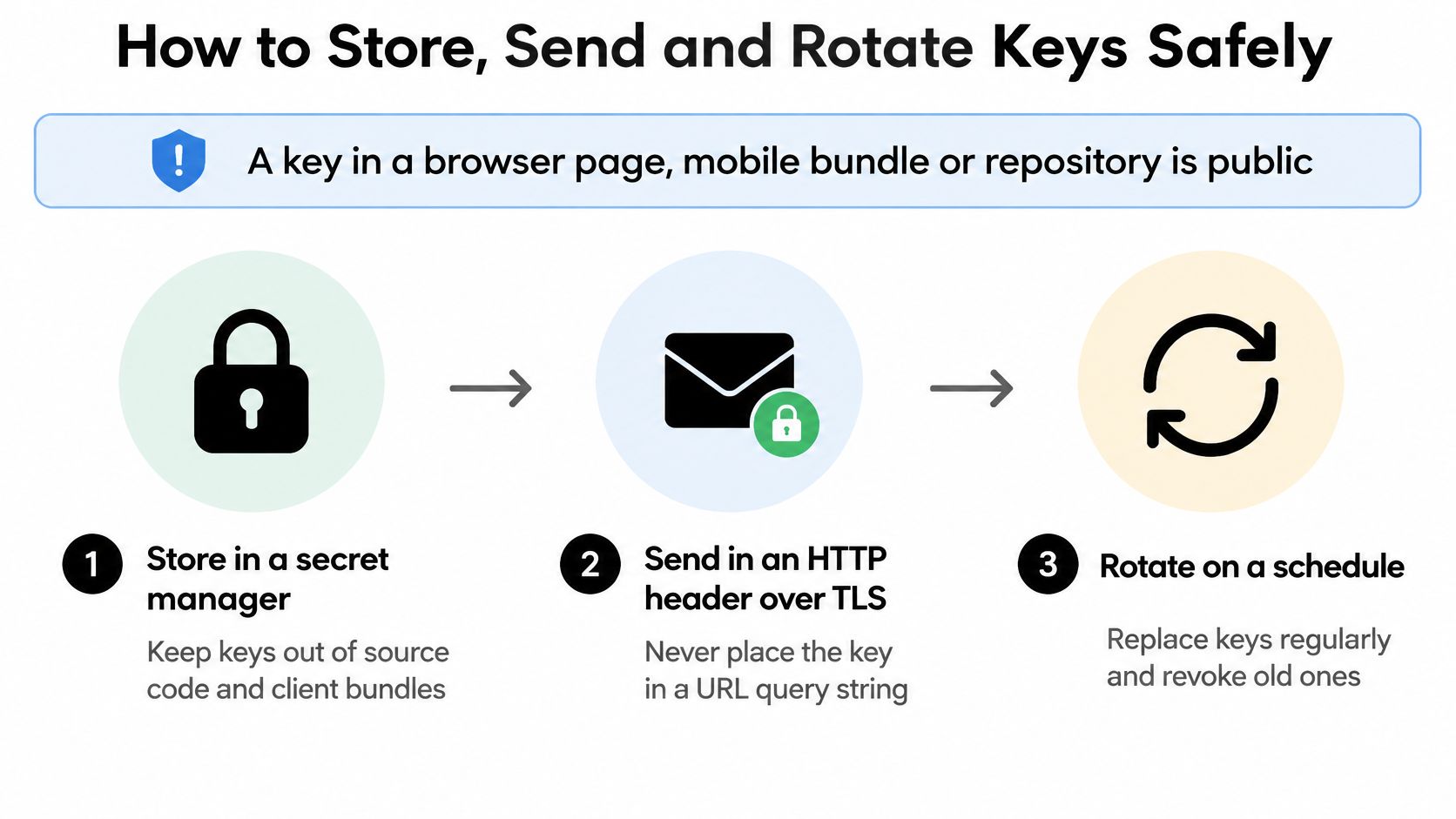
Start from the assumption that any key shipped to a client is public. A value inside a browser bundle, a mobile binary or a Git commit is one devtools panel or one git log away from being someone else's. Everything that follows is about shrinking the damage that assumption implies.
Where the key should live
Keep secrets in a dedicated manager, or in environment variables injected at runtime, and keep them out of source code, build artifacts and configuration files that get distributed or pasted into chat. Give each application, and each person, its own key rather than sharing one across services. Then add restrictions: IP allowlists, referrer or bundle identifiers, and API-level limits so a key can only call the endpoints it was made for. A leaked key with three endpoints is a bad afternoon. A leaked key with eighty is a bad quarter. On our platform, an eo_live_ key is displayed once when you create it, and there's no way to retrieve it later, which forces the copy-it-into-a-secret-store habit from the first minute.
Send it in a header, over TLS
Put the key in an Authorization or X-API-Key header, never in a URL. Query strings end up in browser history, proxy records, CDN logs and analytics tools, and any of those is enough for someone to pick the key out of a report weeks later. Headers stay inside the TLS tunnel and out of the places that log request paths.
Rotate with two live keys, in this order
- Create the replacement key and give it the same scopes as the old one.
- Deploy it everywhere the old key runs, including cron jobs, workers and any script someone keeps on a laptop.
- Confirm traffic has moved by checking usage records per key. The old key should go quiet.
- Revoke the old key once it's receiving nothing.
- Delete the keys nobody uses. A key with no owner is the one that ends up in a public repo.
That order exists to avoid downtime. Revoke first and you break production while you hunt for the places the key was used. Rotation without the usage check is guesswork with a deployment attached.
Finally, treat quotas and budget alerts as a second line of defence. A valid key can run up charges before a human notices, and a hard cap turns a runaway loop into a failed request instead of an invoice. Any secret can be merged into a project with one secret key generator and still be handled badly afterwards, which is why the process matters more than the string.
What to Do When a Key Leaks
Rotation alone doesn't fix a leak. It only fixes the copy you know about.

The evidence for that claim is uncomfortable. In 2024, Nightfall AI found that 35% of discovered API keys were still active. Those keys had been found, which means someone could have rotated them, and a third were still usable. Reporting on GitGuardian data goes further: Security Magazine reports 28.65 million new secrets in public GitHub commits during 2025, and that 64% of secrets confirmed valid in 2022 remained active four years later.
Read those together and the lesson is about discoverability, not discipline. If you can't say which machine used a key, what it could reach and what it cost, revoking it means shutting down something you can't identify.
The response order
- Revoke the exposed key first. Every minute it stays valid is a minute of exposure. Don't investigate before you revoke.
- Read the provider's usage and audit logs from the likely exposure time onward. Look for unfamiliar IPs and unusual volumes.
- Rotate anything the key could have reached or created, including downstream credentials it was able to mint.
- Purge the secret from repository history, CI logs and build caches. Deleting the file, or the repository, does not neutralize a key that was already copied.
- Narrow the permissions and add a spending alert or hard cap so the next incident stops at a limit instead of an invoice.
Two details trip people up. A long-lived key on a usage-billed AI API is the worst combination available: the exposure keeps working and the meter keeps running. And deleting a repository feels final but isn't, because the value was already scraped, cached or forked.
The preventive version of all five steps is the same work done early: scope each credential to a single machine and a single resource, record who owns it, and make revoking one machine possible without touching everything else. We build for that pattern on our platform, with machine-scoped credentials, an immutable audit trail and one-click rotation, precisely because the recovery steps above are impossible to run against credentials that were never attributed in the first place.
Test a Key With a Real Request
You can prove how a key behaves in about ninety seconds, before you read another word of advice about storage. Send one call and look at what comes back.
curl -i -H "X-API-Key: $WIDGET_KEY"
A 200 OK with a JSON body means three separate things went right: the key exists, it's current, and it's scoped to this endpoint. A 401 means the server didn't recognize the value at all. A 403 means it recognized the key but the key isn't allowed here. That distinction matters more than it looks. A 401 points at the credential itself, while a 403 points at its permissions, so the fix is different in each case.
What the server is actually comparing
Many providers never store your key in readable form. They store a hash or fingerprint of it and compare fingerprints on each request, which is why a database leak at those providers doesn't hand out working credentials, and why a forgotten key often can't be shown to you again, only replaced. ExtraOrbital works this way: an eo_live_ key is displayed once when you create it, then only its fingerprint remains. Other providers do keep retrievable keys, so check what yours does before you rely on either behavior.
That's also why the last character matters so much. Change one character of a valid key and the fingerprint won't match anything, so you get 401 rather than a partial failure. If your calls are being throttled instead, the response is 429 Too Many Requests, usually with a Retry-After header telling you how long to wait.
Three checks to run today
- Send one real request with the key and confirm you get
200. - Send it again with the last character changed and confirm you get
401. If you get200, something upstream is ignoring the key entirely. - Search your project logs for the full key value and confirm it doesn't appear. If it does, your logging is capturing headers and needs to stop.
Why the third check matters most: a key in a log is a key in every backup, export and support ticket that log ever produced.
Where your provider offers a sandbox or test mode, run the checks there first so you never touch production data. Where it doesn't, the second and third checks are still safe, since a deliberately wrong key and a log search change nothing upstream. Run them once per key you create and the habit sticks.
Choose the Right Credential Before You Ship
The choice isn't complicated once it's a few direct questions. Run each one against the key you're about to create.
Does this call act for a specific person? If yes, use OAuth 2.0 or OpenID Connect. A key can't record consent, and it can't be revoked by the user whose data was involved.
Is it a fixed server-to-server job with one owner? Then a narrowly scoped key is a sensible fit, and you should name the owner in the project notes.
Could this key reach a browser or a phone? Then move the call to a server. Anything shipped to a client is public, and restrictions only reduce the damage.
Does it trigger billable or sensitive actions? Add a shorter lifetime, a signed request, or a hard spending cap before you ship, not after the first surprise invoice.
Who owns it, and when does it expire? Write the owner, the purpose and the expiry date down somewhere a teammate will find them without asking you.
That last question is one many teams fail, and the numbers explain why it matters. Raidiam's 2025 survey found that approximately 84% of surveyed organizations relied on bare API keys or basic shared secrets for API authentication. A shared secret with no named owner is exactly the credential nobody can safely rotate.
The combined model, in one line: user-facing flows get delegated credentials, backend jobs get scoped keys, and every credential gets an owner, an expiry and a budget.
One step today: pick a single key in your current project and answer four things about it. What is it scoped to, where is it stored, who owns it, and when was it last rotated? If any answer is "I don't know," you've found your next piece of work.
When an app hands off provisioning to a platform, that same accounting should come back with the credentials. Our Connect flow lets a user sign in, pick a team and project, see every environment variable name and price, and approve, then the final screen prints npx extraorbital add commands that write the values straight into .env in the project folder. No key gets pasted between tabs, and nothing lands in a chat message.
If you'd rather not hand-manage the credentials your project needs, ExtraOrbital provisions the databases, storage, auth and AI services your app asks for and writes working credentials into the environment file your code already reads. Every credential is scoped to one machine and one resource, every operation lands in an immutable audit trail, and you can revoke a machine or rotate a project's secrets in a click. Take the four questions from this guide and try them against a real project at ExtraOrbital.