Create Database Online: A Step-by-Step Guide for 2026
Learn how to create database online in minutes: pick the right type, connect your app safely and test backups before launch.
The build passes, the login form renders, and the first request that touches data fails because the connection string points at nothing. You need persistence tonight, and you'd rather not open a support ticket with a cloud provider to get it.
Creating a database online means renting an instance someone else runs. Hardware, patching and storage become the provider's problem, and the connection string becomes yours. The part most guides skip is that the instance appearing in a dashboard is the easy half. The database is finished when the app connects with a scoped credential, access is limited to the machines that need it, and a restore has been run against a backup. Everything here assumes you'll do those things on day one, because retrofitting access control and backups onto a live database is far worse than building them in now.
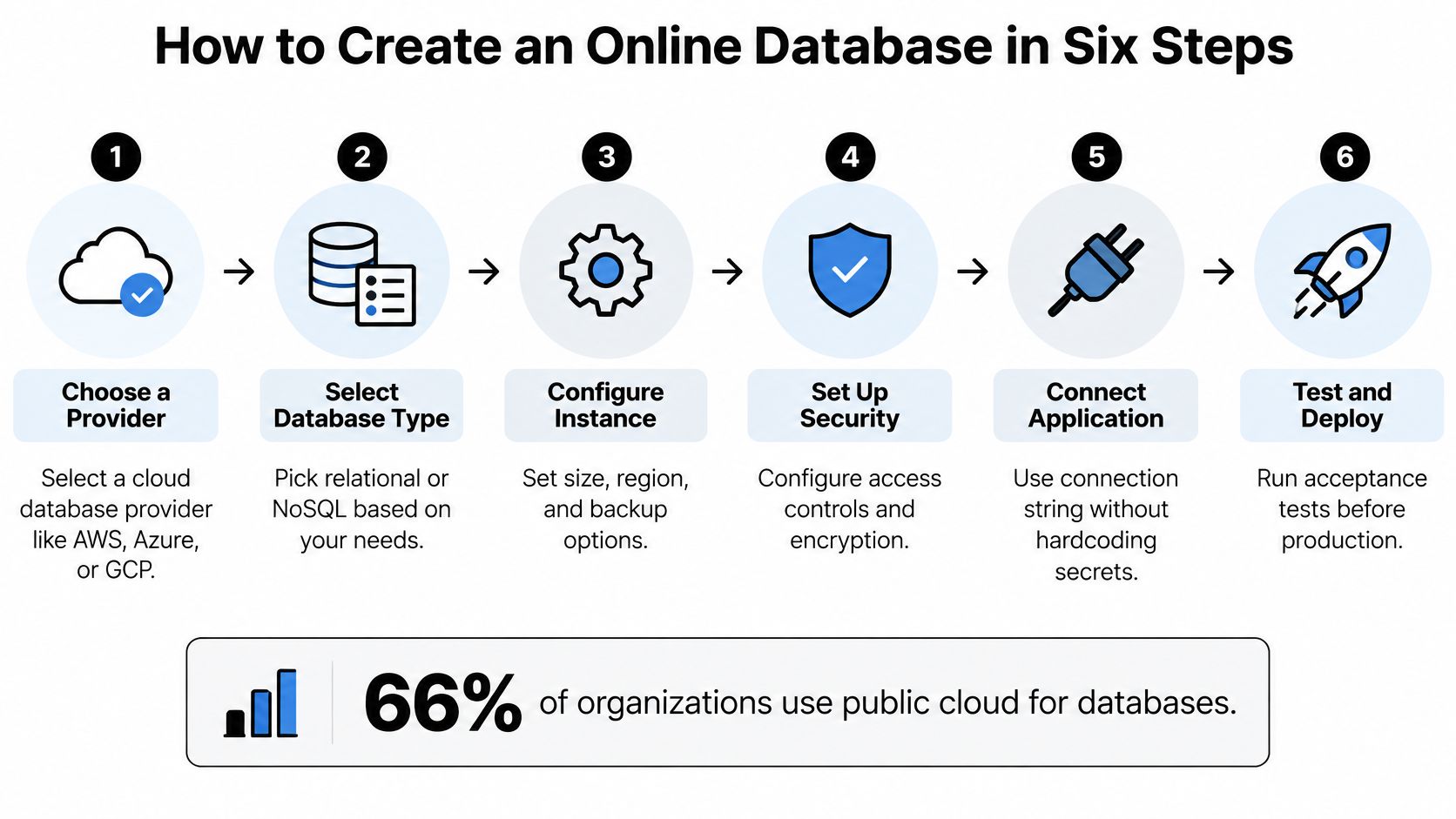
How to Create an Online Database in Six Steps
Managed hosting is the ordinary choice for new databases. In a 2022 S&P Global Market Intelligence survey of data-platform decision makers, 66% of respondents used public cloud as a location for data-platform systems, and 57% preferred cloud environments for new operational workloads.
The six steps below take an empty project to a database your application can query.
- Sketch the entities and relationships first. Write down each table or collection, the key fields it holds, and which screen reads or writes it. An orders table with no line-items table looks fine until the first refund, and the sketch takes ten minutes.
- Choose the engine that matches the workload, using the comparison table below. Relational is the default for anything with money or permissions attached. Document storage earns its place only when records vary in shape.
- Provision two instances, development and production. Experiments, seed rows and half-finished migrations belong somewhere that can be wiped without a status update. If you're still comparing free tiers, this walkthrough of free database cloud options covers what each one gives you.
- Preview the plan before anything exists. Run
npx extraorbital provision . --dry-runto see the resources and changes it would make without creating resources or writing project files. The same habit applies to any provider CLI with a preview flag: read the plan, then apply it. - Write the connection values into the environment file and prove the app reads them. The string goes into
.envin the project folder, and.envgoes into the ignore file before the first commit. Then start the app and log the loaded value, so you know the variable reached the process and not just your shell. - Apply the schema through migrations and seed only non-sensitive data. A migration file lives in the repository, gets reviewed like code, and runs identically in every environment. Seeding with real customer rows is how test data ends up in a screenshot.
The Two Slips That Cost the Most
One instance shared between development and production is the first. It works beautifully until someone truncates a table to test a migration path, and then the team spends a weekend on recovery instead of shipping.
A connection URL pasted into source code is the second. It leaks into git history, CI logs and a shared notebook, and it survives rebases and force pushes. Rotating it later means finding every copy.
Practical rule: if a step can't be repeated from a clean checkout, it isn't part of your setup process yet.
What you should have at the end of these six steps is an instance reachable from the app, credentials read from the environment, and a schema applied from a version-controlled file rather than typed by hand. That's a working database. It isn't yet a trustworthy one.
Choosing the Right Database Type for Your App
The relational model Codd proposed at IBM in 1970 became the foundation of SQL, and the 50 years of queries retrospective in Communications of the ACM points out that the four most popular systems in a December 2023 ranking were all relational. Developers agree with that preference. In 2024, 49% reported using PostgreSQL, making it the most-used database in Stack Overflow's annual developer survey.
| Database | Data shape | Best for | Avoid when |
|---|---|---|---|
| PostgreSQL | Relational tables with keys, joins and constraints | Users, orders, billing, anything needing transactions | You need a simple key-value store with no relations |
| MongoDB-compatible | Flexible JSON-like documents | Content, catalogues, records with varying fields | Your data is heavily joined and reported across many tables |
| Redis-compatible | In-memory key-value pairs | Caching, sessions, counters, rate limits | It is the only copy of data you cannot afford to lose |
| Vector | Embedding vectors with similarity search | Semantic search and retrieval for AI features | You need exact relational queries and updates |
A Rule of Thumb That Holds Up
Start relational unless the data is document-shaped or the access pattern is cache-like. That single sentence resolves most arguments before they start, and it keeps you on the engine with the strongest tooling for migrations, constraints and reporting.
Start relational. Move to documents when a real field list proves the shape varies, not because the schema felt like friction on day one.
Concrete cases make the choice obvious. An order system needs transactions and constraints, because a half-written order is a support ticket and a reconciliation job. A product catalogue where a chair has eleven attributes and a cable has two fits documents, since a relational table would be mostly empty columns. A session store belongs in a Redis-compatible service where expiry is a first-class feature. Search over support articles by meaning, rather than by keyword, is the vector case, and it works best as an addition rather than a replacement.
Most production applications end up with two engines, not one: a relational database as the system of record, plus a cache in front of the handful of reads that happen on every page load. Add the second one when you can name the query it accelerates. Adding it before that point means two stores to keep consistent and one more credential to rotate.
Before you provision anything, write down the three most frequent queries the app will run. Match each one to a row above. If two of the three are transactions, you have your answer, and the fourth engine you were considering can wait.
Connecting Your Application Without Hardcoding Secrets
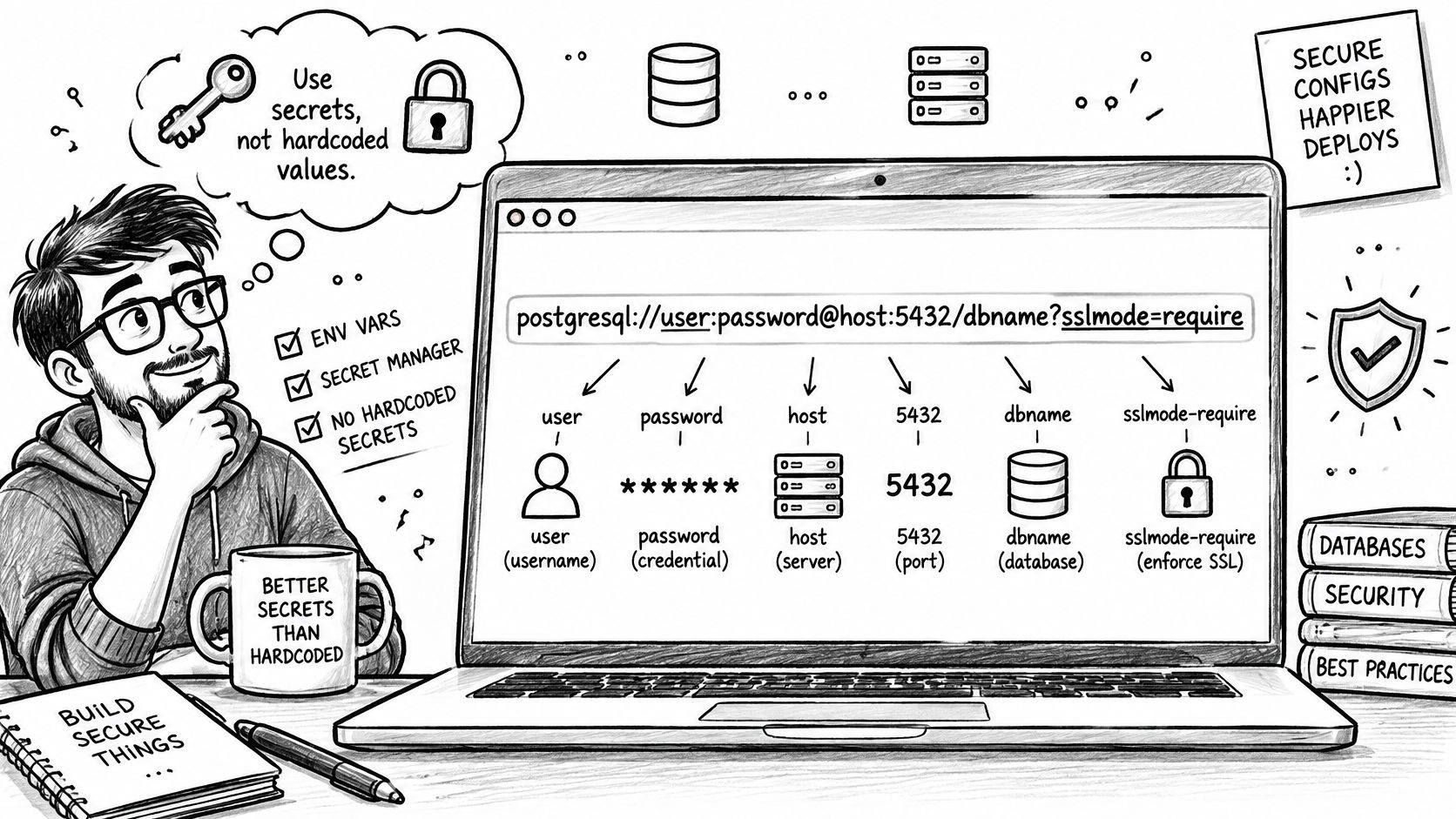
Read a connection string before pasting one into a config file. A Postgres URL looks like this:
postgresql://appuser:9f2c1d@db-host:5432/appdb?sslmode=require
Four pieces carry all the meaning. The user and password are a credential pair, and they should belong to the application role rather than the owner account. The host and port name the server and its listener, with 5432 as the Postgres default. The database name is the specific database inside that server, since one instance can hold several. The TLS setting, usually sslmode=require, refuses an unencrypted connection instead of falling back to plaintext.
Those values live in an environment file in the project folder, normally .env, and that file is listed in .gitignore before the first commit. This is the step people skip under deadline pressure, and it's the one that decides whether a password ends up in git history.
You don't have to retype any of it. When a provisioning flow finishes without a redirect URI, the user approves, the resources are created, and the last screen shows npx extraorbital add commands that write the values into .env in the project folder. Adding a service later works the same way, so npx extraorbital add redis drops the Redis URL in alongside the existing values instead of asking you to copy it from a console.
A Next.js app reads DATABASE_URL from that file at startup, and the ORM (Prisma, Drizzle or node-postgres) opens a connection pool on the first query rather than per request. That detail matters, because a new connection per request will exhaust the server's limit under modest load. For a deeper walkthrough of the driver and pool settings, see connecting a Postgres database to an application.
Then prove it. Run SELECT 1 through a client to confirm the network path, TLS and credentials are all correct, and immediately after that run one real query taken from the app's own code. The first test proves the connection exists. The second proves the app can use it.
When the First Connection Fails
- Connection refused usually means the wrong host or port, often a copy of an internal hostname that only resolves inside the provider's network.
- An SSL-required error means the TLS parameter is missing or the client is refusing to validate the certificate. Add
sslmode=requireand check the CA bundle path. - A timeout is rarely a credentials problem. It usually means your address isn't on the access list, or the database is bound to a private network you aren't on.
- Too many connections means there is no pool, or the pool limit is higher than the server's connection cap times the number of app instances.
Debugging order: host and port first, TLS second, access list third, pool size last. That sequence resolves most first-connection failures in a couple of minutes.
Provisioning From a Coding Agent
When Claude Code, Cursor or a similar tool creates the database, the credential model changes. Give the agent a machine identity separate from any human account, scope it to one project, and never let it see the owner credential. Preview with a dry run, require human approval before production or destructive changes, and write every provisioning and credential action to an immutable audit log. An environment variable answers none of the questions that matter at review time: who created the credential, which machine used it, what else it can reach, and when it expires.
Locking Down Access Before Real Data Arrives
A database isn't safe because it's new, and it isn't private because nobody has the URL yet. The first deliverable after provisioning is a role table, written down before the first real row arrives.
| Role | Allowed actions | Credential | Used by |
|---|---|---|---|
| Migrations | Create and alter tables, no routine data reads | Short-lived, issued per deployment | Deployment pipeline |
| Application | Read and write its own tables, no schema changes | Scoped, rotated on a schedule | Web and API servers |
| Reporting | Read-only access to the tables it needs | Read-only credential, separate from the app | Analytics and dashboard tools |
| Operations | Backups, restores and audit log access | Time-limited and approved per task | On-call engineers |
Four controls sit around that table. Bind the database to private networking wherever the provider supports it, so the public internet isn't a candidate path. Allowlist inbound access by address or identity-aware policy, which is a far stronger control than a long password. Disable public administration endpoints, because a console reachable from anywhere is a second front door nobody monitors. Require TLS certificate validation on every connection, including the ones from internal services that "are already inside the network".
Separation exists because of what a mistake costs. Application code holding owner privileges can drop a table through a bad migration or an injection bug. A reporting tool with write access can corrupt rows during a backfill. Neither scenario requires malice, just a busy afternoon.
The 2025 Verizon Data Breach Investigations Report found credential abuse in 22% of breaches and vulnerability exploitation in 20%, with third-party involvement at 30%. Most of that starts with a credential that had more reach than the task required.
Three pitfalls account for a lot of incident reports. Granting owner privileges to the app because it was quicker than writing a role. Reusing one credential across a laptop, a CI runner and a staging server. Leaving a temporary database running months after the experiment ended. Set an expiration on experimental resources and a budget cap on the project, and the third one stops being a recurring invoice.
Maintain an audit trail for provisioning, privilege changes, credential use and destructive operations, and rotate credentials whenever a person or a machine leaves the project. For the concrete ordering of role creation, allowlisting and revocation, this guide to creating database access walks through the sequence step by step. By the end of this you should be able to list every principal that can reach the database and what each one is permitted to do.
Create Your First Development Database and Pass Acceptance
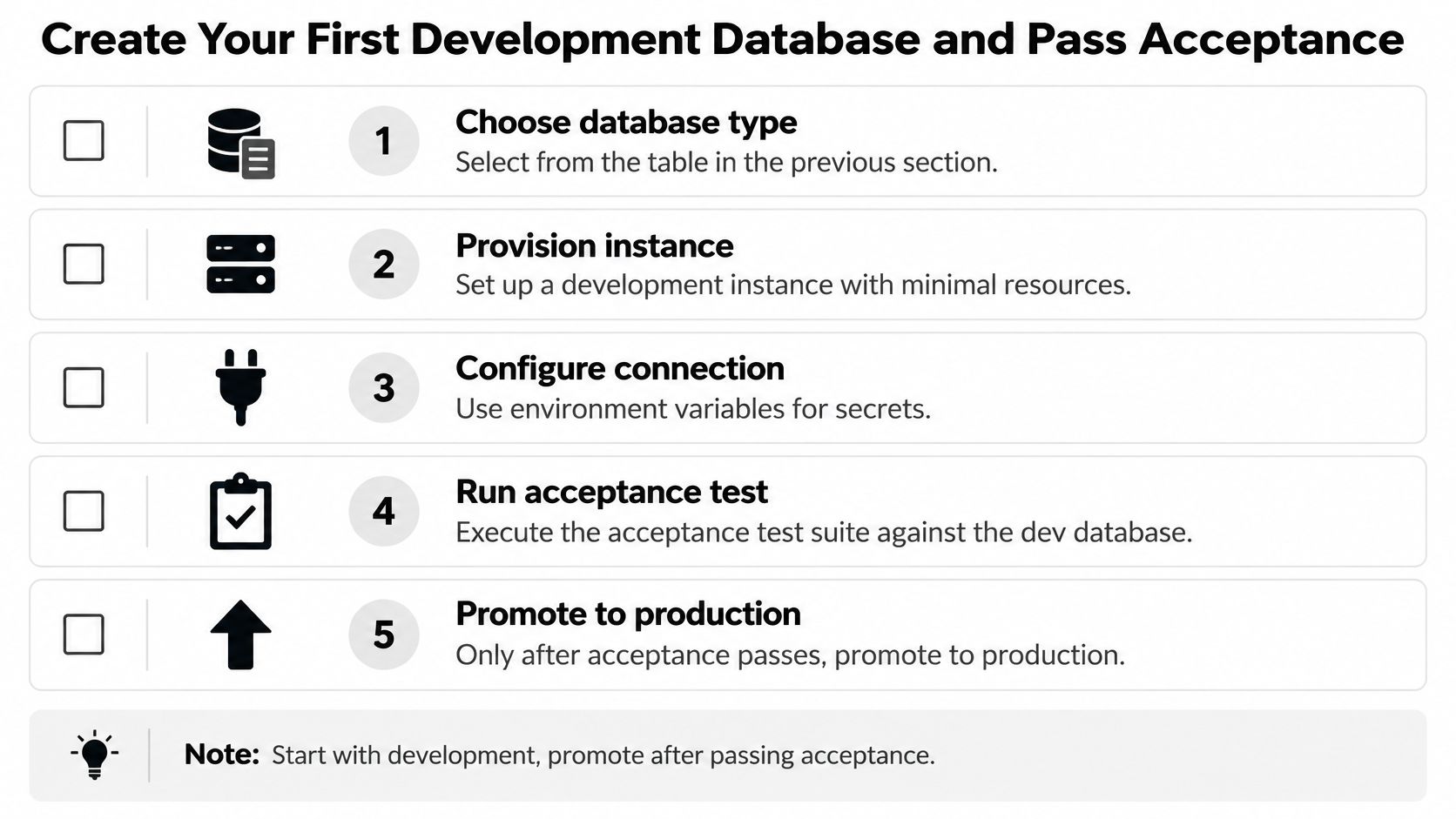
Create the development database today. Promote it to production after it passes an acceptance test you ran yourself, not after the dashboard turned green.
- Pick the type from the comparison table using your three most frequent queries.
- Provision the development instance, running the preview step first so you see the plan before the resources exist.
- Connect the app and run its own queries against the instance, not just a health check.
- Keep it small. A development instance needs enough storage for realistic row counts and nothing more, since the point is behavior under real schema, not throughput.
Here's the checklist those four actions and the test below follow, from engine choice through promotion.
The Acceptance Test That Decides Go or No-Go
Six checks, run in order, on a clean checkout:
- Provision from nothing in a fresh environment and confirm the app connects with no manual steps and no console clicking.
- Run migrations twice and confirm the second run changes nothing. That's your idempotency proof, and it's the check that catches a schema drift problem before a deploy does.
- Deny an unauthorized role by attempting a write from the reporting credential and confirming it fails.
- Rotate one credential and confirm the app recovers after a restart without anyone editing code.
- Restore the latest backup into an isolated database, then query it.
- Compare five representative queries against expected results, including one that joins across three tables.
Go/no-go: ship only when every acceptance step passes and monitoring is live for latency, errors, storage, connections and replication lag. Anything less is a launch with an unknown failure mode.
Secret handling deserves its own line here. A Verizon 2025 analysis covering 22,052 incidents and 12,195 confirmed breaches reported a 94-day median remediation time for leaked secrets found in GitHub repositories. Three months is longer than most projects live. Inject credentials through a secret manager or short-lived scoped credentials instead of copying them into source, CI logs or notebooks.
What the Free Plan Covers and When to Leave It
Your first team is on the Free plan and needs no card, which is enough to build against. Free is for building rather than production: there are no backups, no uptime guarantee, and resources may be deleted after inactivity. Move off it the moment the data matters, backups are required, or someone else depends on the service being up, and expect a payment card before a second team is created.
If you're bringing an existing MongoDB database across, the migration copies the data, checks document counts and index names, then replaces credentials and deletes the old database after cutover. A migration aborts if documents are missing, and the original database is preserved in that case, so a partial export never becomes your only copy.
The decision at the end of this is binary. Every acceptance step passes and monitoring is live, or the instance stays a development database and you keep working. A database, a connected app and a tested recovery path is the whole deliverable.
ExtraOrbital provisions Postgres, MongoDB-compatible, Redis-compatible and vector databases from a single command, then writes the connection values where your application already looks for them, with credentials scoped to individual machines, an immutable audit trail and optional expiry on every resource it creates. If you'd rather spend tonight on application logic than on console screens, ExtraOrbital will get a development database and its credentials into your project in one run, including a dry-run preview before anything is created.