CREATE DATABASE if NOT EXISTS: Support and Workarounds
Does CREATE DATABASE IF NOT EXISTS work in your database? Compare MySQL, MariaDB and PostgreSQL support, plus safe workarounds for idempotent setup scripts.
CREATE DATABASE IF NOT EXISTS is native syntax in MySQL and MariaDB and doesn't exist in PostgreSQL, so you have to identify the engine before you trust the statement. That one fact explains most bootstrap scripts that pass on a laptop running MySQL and then die on the first deploy against Postgres.
You've probably got a setup script that runs on every start. The Docker entrypoint, the CI job that runs before the test suite, the migration runner fired at application boot. It calls create database if not exists, it works on your machine, and then the pipeline fails at step one against a different engine. Or it succeeds, and the app connects to a database somebody created eight months ago with the wrong collation, an empty schema, and an owner nobody recognizes.
Both failure modes come from the same misunderstanding. The clause is an existence guard on a name. It isn't a statement about what the database contains or how it's configured.
What CREATE DATABASE IF NOT EXISTS Actually Does
Setup scripts run more than once. The database name is fixed, containers restart, ephemeral environments get torn down and rebuilt, and the script has to complete without a human deciding whether the database is already there. That's the problem the clause solves.
CREATE DATABASE IF NOT EXISTS app_db; creates the database named in the statement and, when that name is already taken, suppresses the duplicate-name error instead of aborting the run. Nothing about the existing database gets read, compared, or changed.
The support picture is uneven. MySQL and MariaDB implement the clause natively. PostgreSQL has no IF NOT EXISTS option on CREATE DATABASE at all, and SQL Server and SQLite don't offer the pattern either, which is why a large share of the people searching this syntax need a workaround rather than a synonym. That share is big: in 2025, PostgreSQL was used by 55.6% of respondents to Stack Overflow's global Developer Survey, making it the most commonly reported database technology.
The rest is engineering detail. There's a support table for the engines you'll meet, working procedures for MySQL and MariaDB, the Postgres workaround that doesn't involve a fake clause, an honest accounting of what a successful no-op doesn't promise, and a provisioning pattern that holds up when two workers start at the same time. By the end you should be able to choose the right idempotent pattern for your engine and prove that the database you ended up connected to is usable, not merely present.
Database Support at a Glance
Start with the portability warning, because it's the part that bites. CREATE DATABASE IF NOT EXISTS is a vendor extension, not part of the SQL standard, so similar keywords across engines do not mean portable SQL. PostgreSQL's CREATE DATABASE reference documents the statement with no IF NOT EXISTS option at all, and it adds a second constraint that surprises people coming from MySQL: CREATE DATABASE cannot run inside a transaction block, which rules out the usual check-then-create-in-one-transaction trick. On the other side, MySQL documents the syntax as CREATE {DATABASE | SCHEMA} [IF NOT EXISTS] db_name, with SCHEMA accepted as a straight synonym for DATABASE.
| Database | IF NOT EXISTS support | Behavior when it already exists | Recommended alternative |
|---|---|---|---|
| MySQL | Supported | Error suppressed, statement is safe to rerun | None needed, add character set and collation in the same statement |
| MariaDB | Supported | Warning returned instead of an error | None needed |
| PostgreSQL | Not supported | Statement fails with duplicate-database error 42P04 | psql \gexec check on pg_database, or autocommit check-then-create |
| SQL Server | Not supported | IF NOT EXISTS is a syntax error in CREATE DATABASE | IF DB_ID('app_db') IS NULL CREATE DATABASE app_db |
| SQLite | No CREATE DATABASE statement | The database is the file itself | Check whether the file exists before connecting |
| MongoDB | No database DDL | Database is created implicitly on first write | Nothing to guard, insert a document or create a collection |
Walking the rows: in MySQL the clause turns a setup script into something safe to rerun, and the same statement accepts character set, collation and encryption options. MariaDB follows the same model but reports a warning where MySQL stays quiet. PostgreSQL rejects the clause outright, so teams need the catalog check covered further down. SQL Server needs a guard on sys.databases via DB_ID. SQLite has no creation statement because the database is the file, and MongoDB creates the database on first write, so there is nothing to guard.
Read the middle column as a contract. Each engine that supports the pattern promises only that a database with that name will exist after the statement runs. None of them promise that the existing database carries the character set, collation, or options your script just asked for, because a no-op touches nothing.
Identify the engine before you generate the statement. A script written for MySQL can fail outright on PostgreSQL, and no amount of retry logic fixes a syntax error.
How to Use the Clause in MySQL and MariaDB
In MySQL and MariaDB, IF NOT EXISTS guards the database name only. It lets a bootstrap script run again, and it still leaves character set, collation, tables, grants, and the actual target of the connection string to be checked separately.
Confirm the dialect and the target. The clause is MySQL and MariaDB specific. If the connection string points at Postgres, stop and use the other procedure. Within MySQL and MariaDB,
SCHEMAandDATABASEare interchangeable, so pick one spelling and keep it consistent across the repo. A rerun can also succeed against the wrong host, so check the connection target before you celebrate the clean exit.Put the statement where every deploy runs it.
CREATE DATABASE IF NOT EXISTS app_db;belongs in the path that executes on each setup: a Docker entrypoint, adocker-entrypoint-initdb.dscript, or a CI step before the test suite. The useful property is the second run succeeding.Pin character set and collation in the same statement.
CREATE DATABASE IF NOT EXISTS app_db CHARACTER SET utf8mb4 COLLATE utf8mb4_unicode_ci;matters because the options apply only at first creation. An existing database is left untouched, so if the name was created earlier by a server default, this statement leaves that default in place.utf8mb4_unicode_ciworks on both MySQL and MariaDB;utf8mb4_0900_ai_ciexists only on MySQL 8 and fails on MariaDB, which makes it a poor choice for anything shared.Prove idempotency by running it twice. The second execution succeeds with no change, and on MariaDB the result reports one warning. If your script treats warnings as fatal, it fails here for no useful reason.
Read back what exists. Run
SHOW CREATE DATABASE app_db\Gand check the character set and collation instead of assuming your statement took effect. This is the part that catches an old database created with different defaults, because IF NOT EXISTS will not repair it.Grant narrowly after verification. Give the application user only the privileges it needs on that database, not global rights. If migrations run under a separate user, keep that user separate too.
The boundary to hold in mind: the statement creates an empty database with no tables, because a newly created MySQL database is just a directory with nothing in it. Schema migrations are a separate step that runs afterwards and always runs. My rule of thumb is that explicit character set and collation beat server defaults every time, because defaults drift between server versions, between managed providers, and between the container and production.
The PostgreSQL Workaround for Idempotent Creation
Postgres doesn't have the clause, and it isn't an oversight. CREATE DATABASE can't run inside a transaction block, and the transaction machinery is where an existence check would naturally live. Copy a MySQL statement over and you get a syntax error; wrap it in a transaction to be careful and you get CREATE DATABASE cannot run inside a transaction block. Both messages send people looking for the wrong fix.
Take bootstrapping a database for Django, Alembic, or a pytest suite. The script has to work on the first run, on the hundredth run, and when two CI runners hit it simultaneously.
Use
\gexecin psql.SELECT 'CREATE DATABASE app_db' WHERE NOT EXISTS (SELECT FROM pg_database WHERE datname = 'app_db')\gexecgenerates the CREATE only when the catalog check returns a row.\gexecexecutes whatever the SELECT produces, so an empty result means nothing runs. This is the cleanest one-off.Connect to the
postgresmaintenance database first. You can't create a database while connected to a database that doesn't exist yet, and that's the failure most application bootstrap code hits on a fresh environment.Run it in autocommit mode. In SQLAlchemy, that means an engine with
isolation_level="AUTOCOMMIT". Any driver that opens a transaction implicitly will trip the same transaction-block error, and the traceback points at the CREATE rather than the connection setting.Treat SQLSTATE 42P04 as success. Two workers race, one wins, the loser gets
duplicate_database. Catching that specific code is the concurrency answer. Catching everything is how a permissions failure gets mistaken for a duplicate.Verify what exists.
SELECT datname, pg_encoding_to_char(encoding), datcollate FROM pg_database WHERE datname = 'app_db';tells you whether the database is UTF8, what collation it carries, and whether it exists at all. Use this when you're reviewing the list of databases and their properties in a Postgres instance.
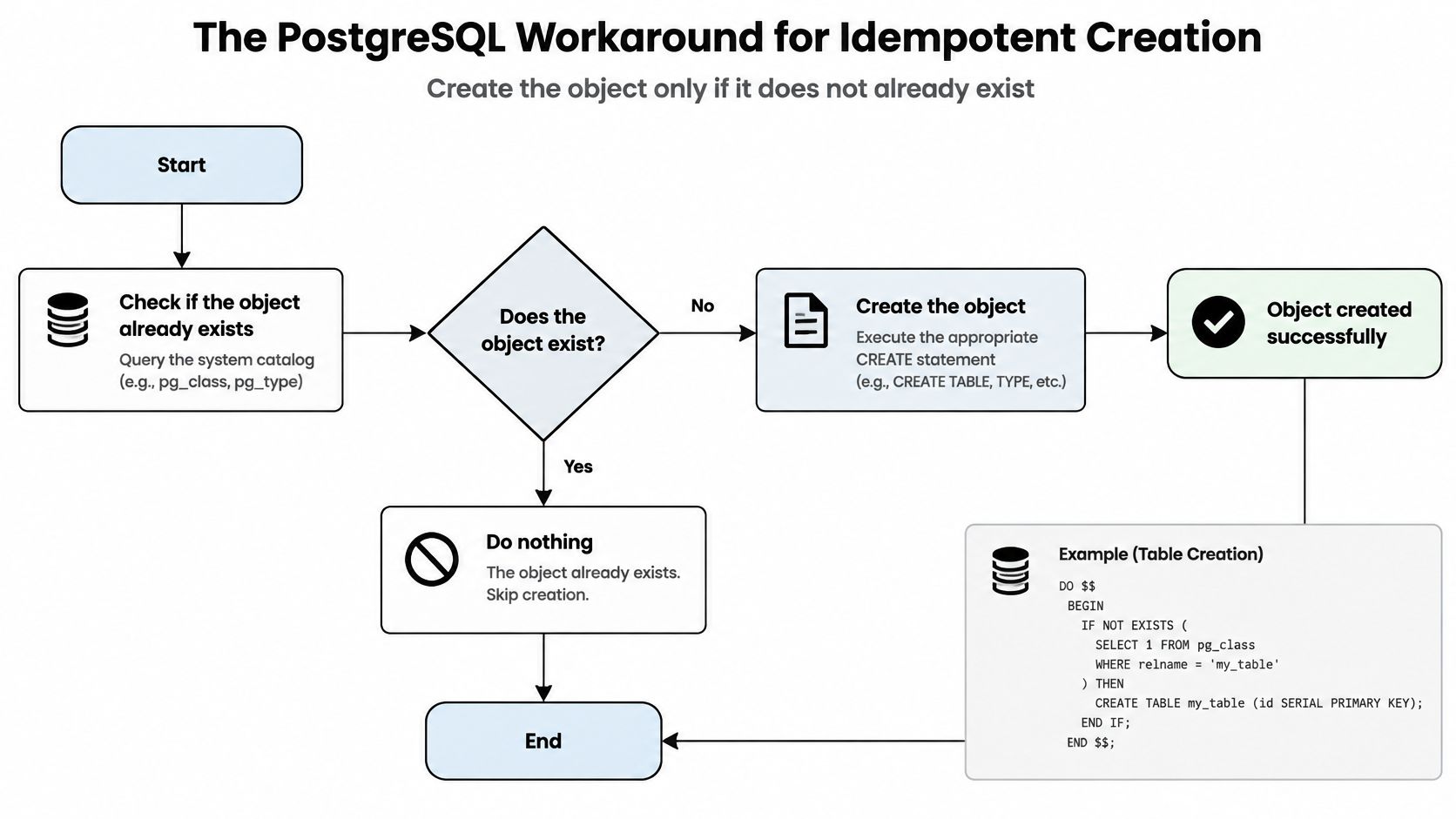
A shell variant works when psql is the only tool available: run psql -U postgres -tc "SELECT 1 FROM pg_database WHERE datname = 'app_db'" | grep -q 1 || psql -U postgres -c "CREATE DATABASE app_db". It's racier than the catalog-check approach because the two commands aren't atomic, which is fine for a single-runner deploy and not fine for a fleet.
Don't wrap it in a transaction and don't put it in a function. PostgreSQL's own diagnostics are telling you the statement runs outside transactional context, and both workarounds break that rule quietly.
What a Successful No-Op Does Not Guarantee
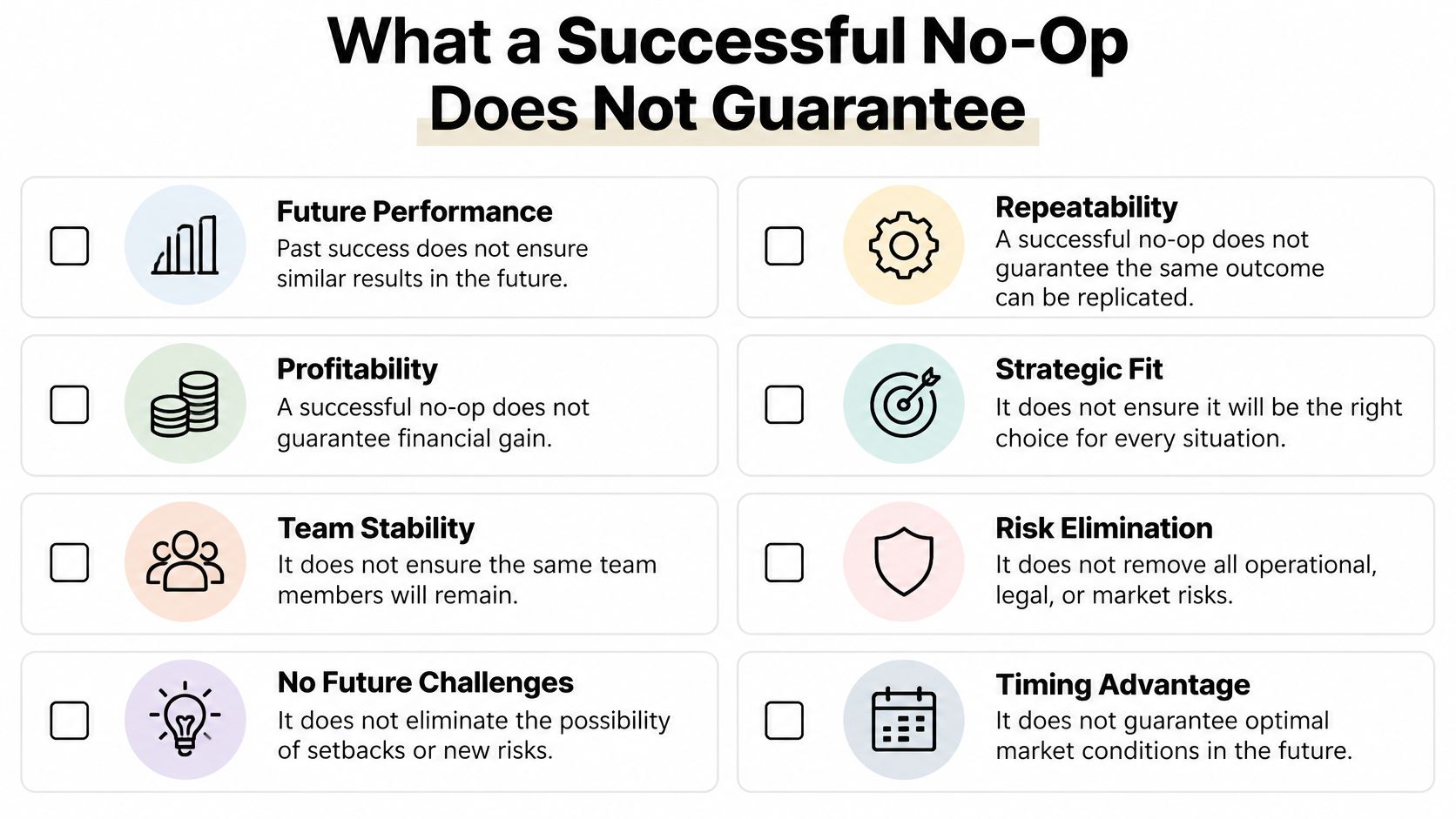
A clean exit code means the name was found or the directory was created. MySQL's CREATE DATABASE reference spells out the narrow mechanics: the statement creates the named database and initially creates only a directory under the data directory, because a new database contains no tables. With IF NOT EXISTS, rerunning suppresses the duplicate-database error and leaves an existing database untouched. It does not compare owner, encoding, collation, grants, table set, or migration level against your spec.
MariaDB makes the outcome visible, reporting a warning instead of an error, with CREATE DATABASE IF NOT EXISTS db1 returning one warning when the database is already there. That warning is the only signal you get that nothing happened, and most scripts discard it. A deploy can stay green while app_db still carries the wrong defaults, the wrong owner, or a missing migration table.
The replication caveat
In replicated MySQL environments, every CREATE DATABASE IF NOT EXISTS statement is replicated whether or not the database already exists on the source. A command that does nothing locally still travels downstream and gets evaluated there. If a replica has drifted, or the statement arrives in a different ordering than you expected, the no-op stops being a no-op. Log whether each run created the database or found it existing, because a silent run of no-ops hides drift perfectly.
The drift fixes
When inspection shows the wrong configuration, fix it explicitly instead of rerunning the guard.
- MySQL character set and collation:
ALTER DATABASE app_db CHARACTER SET utf8mb4 COLLATE utf8mb4_unicode_ci;changes the defaults for new tables. Existing tables keep theirs and need their own ALTER. - PostgreSQL ownership:
ALTER DATABASE app_db OWNER TO app_owner;is straightforward and worth doing in the same script. - PostgreSQL encoding and collation: these cannot be changed in place. Dump the database, drop it, recreate it with the correct settings, restore, then reissue the access grants your application user needs so the restored objects are reachable.
IF NOT EXISTS confirms that the name is taken. Decide separately whether the database is right: inspect the catalog, compare the declared spec, then repair or migrate.
MySQL does expose character set, collation and encryption options inside the same statement, and that still is not reconciliation. The options only apply at creation time, so they describe what you wanted on day one, not what exists on day four hundred. Treat the clause as a bootstrap guard, then run explicit checks before traffic or migrations depend on it.
Diagnosing Errors in Automated Database Setup
Provisioning should be explicit about three distinct states: the resource exists, the resource is usable, and the resource matches the declared specification. The clause handles the first. Everything else needs code.
MySQL's documentation on CREATE DATABASE confirms the narrow scope: the statement creates only the database directory at first because a new database has no tables. So a successful no-op can leave an automated agent connected to a stale or misconfigured database unless the same provisioning step runs postcondition checks and migrations. Privileges follow the same pattern: PostgreSQL requires creation authority through CREATEDB, while MySQL requires the CREATE privilege, and neither is implied by the ability to connect.
The pattern that holds up:
- Attempt dialect-appropriate creation.
- Catch only the expected existence condition, MySQL error 1007 or PostgreSQL SQLSTATE 42P04, rather than a bare catch-all.
- Reconnect if the driver requires it after creation.
- Check postconditions against the declared spec: owner, encoding, collation, grants, and the migration version table.
- Run versioned migrations under an advisory lock such as
pg_advisory_lock, so parallel workers can't apply the same migration twice.
| Symptom or error | Likely cause | Fix |
|---|---|---|
| MySQL error 1007 Can't create database, database exists | Statement omitted IF NOT EXISTS | Add the clause or catch error 1007 as success |
| PostgreSQL CREATE DATABASE cannot run inside a transaction block | Statement wrapped in a transaction | Run it on an autocommit connection or via psql \gexec |
| Permission denied on CREATE DATABASE | User lacks CREATEDB in PostgreSQL or the CREATE privilege in MySQL | Grant the privilege or provision through an admin connection |
| Two workers race and one deployment fails | Check-then-create without handling duplicates | Catch the existence error and continue |
| Application connects but tables are missing | Database existed but migrations never ran | Run versioned migrations after creation under an advisory lock |
The last row is the expensive one. A pipeline goes green, the app starts, and the first request fails on a missing relation because the database was created by a previous run and nobody applied the migration. Nothing in the creation path catches that, and nothing in the clause was ever going to.
Practical rule: if your bootstrap script can't answer "which migration version is applied" after it finishes, it isn't a provisioning script. It's a hopeful one.
Choosing the Right Pattern for Your Stack
One verdict per environment beats a general recommendation.
Local development on MySQL or MariaDB. Use the clause directly with explicit character set and collation. It's cheap, it's what you're running in production, and the second run proves itself.
PostgreSQL application bootstrap. Use the psql \gexec catalog check or an autocommit connection. If your framework already manages a test database, let it, because Django and Rails both handle existence for their test runners and duplicating that logic introduces a second path to maintain.
Multi-engine CI and production pipelines. Push existence handling into a migration tool: Flyway, Liquibase, Alembic, or Prisma Migrate. Keep ad hoc CREATE DATABASE IF NOT EXISTS out of application code, because application code shouldn't need creation-level privileges at runtime.
Anything else. SQL Server gets an IF DB_ID IS NULL guard, SQLite gets a file check, MongoDB gets nothing because creation happens on first write. Build the guard once, in one place, and don't scatter it across services.
If you'd rather not hand-roll that guard for every new project, ExtraOrbital's provisioner takes the same position as this article. Its POST /provision returns 201 when it creates a resource and 200 when the resource already existed, so the caller can tell creation from reuse, and running the provisioning CLI in a project folder fills in missing credentials while keeping existing working values. A --dry-run flag previews the plan without creating anything.
Whichever path you pick, finish the job: create the database, then verify the owner, the encoding, the grants, and the migration version before the application connects. A no-op that leaves you on the wrong database is worse than an error that stops the deploy.
ExtraOrbital provisions Postgres, MongoDB, Redis and vector databases from a project's requirements with one command, so the existence check and the credential write happen in the same step instead of two scripts that drift apart. Run npx extraorbital provision . in a project folder and it detects missing credentials, creates the matching services, and fills in the values your code already reads. Visit ExtraOrbital to see how the provisioning flow handles the created-versus-reused distinction for your stack.